




When Google rolled AI Overviews into nearly half of all search results, an uncomfortable question landed on every SEO team’s desk: if the answer is on the page, why click through at all? The honest answer is that most users don’t. Organic click-through rates drop by up to 61% when an AI Overview triggers. But brands that get cited inside those AI-generated summaries earn 35% more organic clicks than those that don’t.
That gap — between being summarized and being cited — now decides where search traffic goes. To understand how to land on the right side of it, we reviewed the patterns documented across recent AI Overview studies and compared which sources got cited and which got passed over. The findings cut against several common assumptions about how to show up in AI overviews SEO playbooks.
What AI Overviews Pull From (It’s Not Just the #1 Ranking)
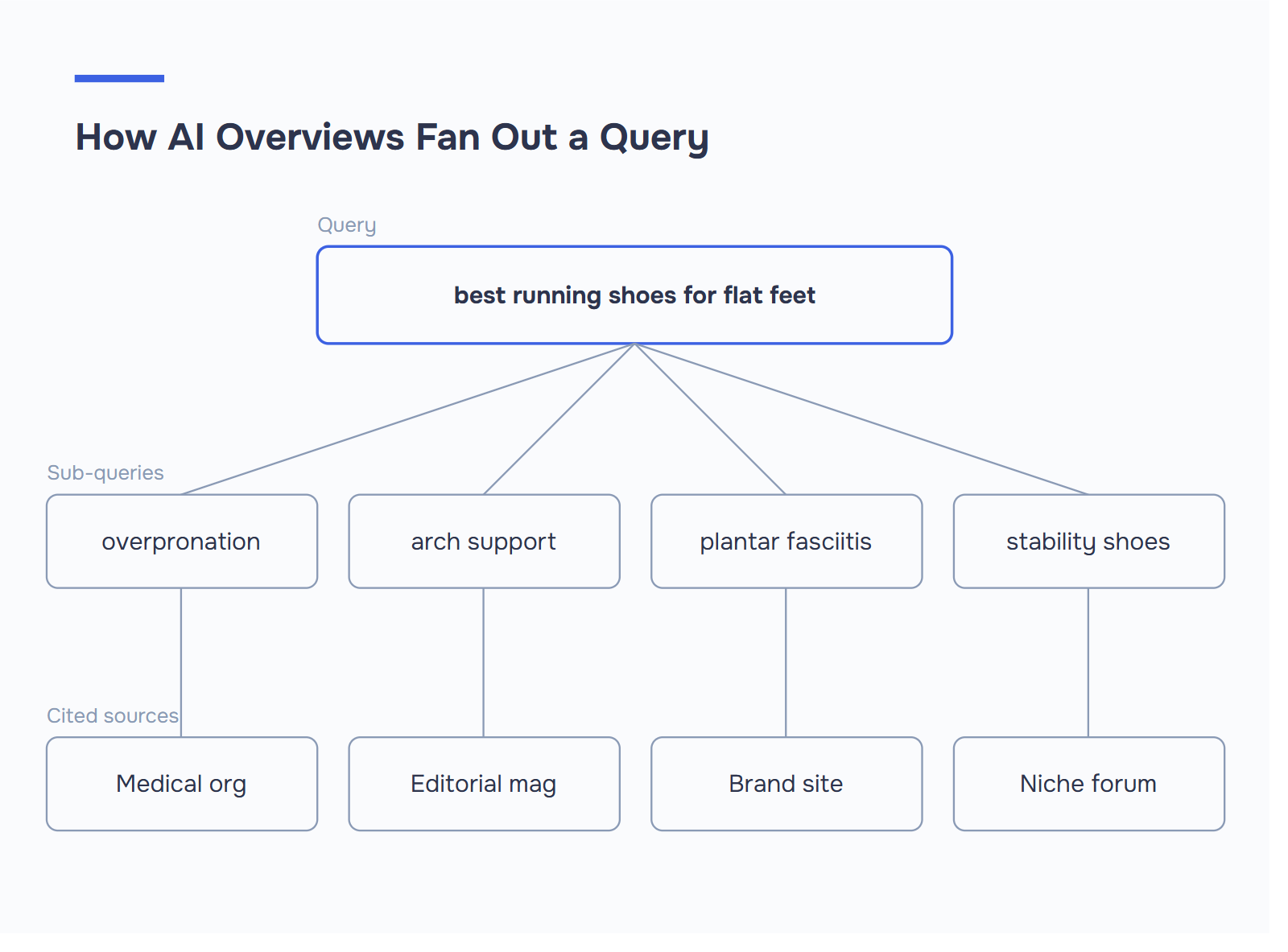
AI Overviews don’t simply pluck the top organic result. They decompose a query into sub-questions, search each one separately, then assemble citations from sources that best answer each fragment — a process Google calls query fan-out.
Links in the first position have around a 53% chance of appearing in AI Overviews, while those in the 10th position drop to roughly 37%. More striking: over 99% of AI Overview citations come from pages ranking in the top 10 organic results, with citation overlap around 94%. So traditional SEO is still the floor. It’s just no longer the ceiling.
Across the patterns we reviewed, three things kept repeating:
- The cited page wasn’t always the highest-ranked. Pages in positions 3–8 got pulled into overviews when their structure was cleaner than the #1 result’s. The AI prioritizes the clearest passage, not the strongest domain.
- Smaller sites beat bigger ones on focused queries. Smaller brands appeared alongside large companies, and in many cases the selected source was not the highest-ranking page.
- Sub-queries unlock niche citations. A broad query about “AI Overviews ranking” might cite one source for the algorithm, another for schema, and a third for tracking. This is query fan-out in action.
The practical takeaway: stop optimizing pages as monolithic answers. Optimize sections — H2-level passages that fully resolve one sub-question each.
The fan-out diagnostic. Pick your target keyword and write down 3–5 sub-queries it would plausibly decompose into. For “best running shoes for flat feet”: overpronation shoes, arch support sneakers, plantar fasciitis running gear, stability vs neutral shoes. Now scan your own page. Does it answer each sub-query in a self-contained passage with a clear H2 or H3? If two of the five are missing — or buried inside a 400-word block — that’s where your competitor is getting cited and you aren’t.
Content Format Requirements: Structure Is the New Authority
Clear structure beats prose density for AI extraction. The single biggest determinant of whether an AI can cite your content is whether it can extract a clean answer block without ambiguity.
Three structural patterns dominated cited sources:
- Self-contained answer passages. Research analyzing thousands of AI Overview citations suggests AI prioritizes passages that fully answer queries in roughly 130–170 word self-contained units. A passage that needs context from three paragraphs up will lose to a paragraph that stands alone.
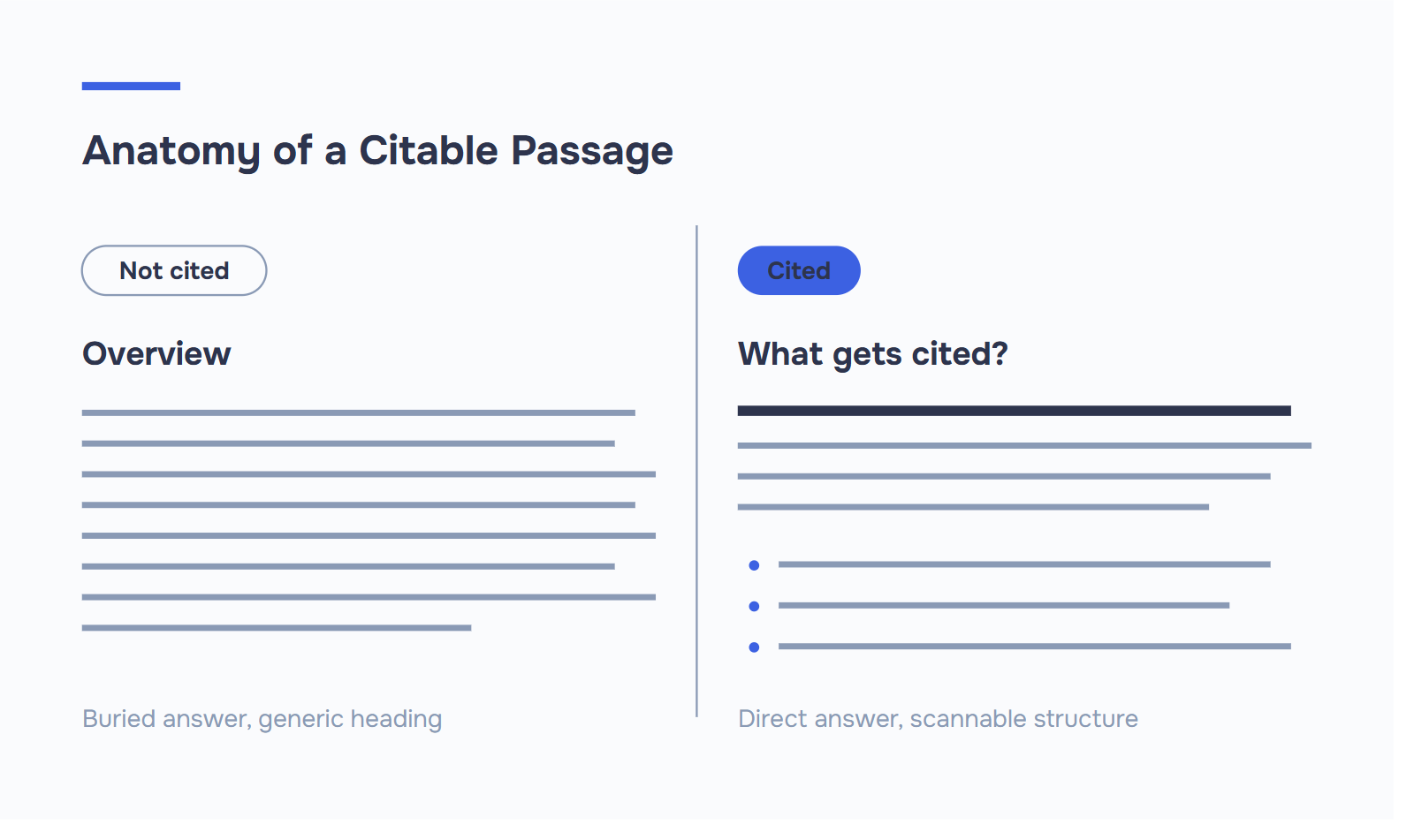
- Hierarchical H2/H3 architecture. Cited pages overwhelmingly used question-style H2s (“What is X?”, “How does Y work?”) followed by a direct answer in the first 1–2 sentences. The pattern is so consistent it’s almost templated.
- Lists, tables, and step blocks. Dense paragraphs and missing headings make content difficult for AI to extract. Clear hierarchical headings, short paragraphs, bullet lists, and tables enhance scannability — for humans and for extraction models alike.
Here’s what the data suggests is the difference between “ranked” and “cited”:
| Element | Ranked but not cited | Ranked AND cited in AI Overviews |
|---|---|---|
| Opening sentence under H2 | Sets up context | Directly answers the heading question |
| Paragraph length | 150–300+ words | 40–80 words, one idea each |
| Lists & tables | Rare or decorative | Used to structure comparisons & steps |
| Headings | Generic (“Overview”, “Benefits”) | Question-form (“How does X work?”) |
| Internal references | “As we mentioned above…” | Each section stands alone |
| Multimodal elements | Text only | Text + image + structured data |
Pages that combine text, images, video, and structured data show meaningfully higher selection probability across multiple AI Overview studies. Multimodal content isn’t decoration — it’s a citation signal.
Schema Markup That Helps: FAQPage, HowTo, Article
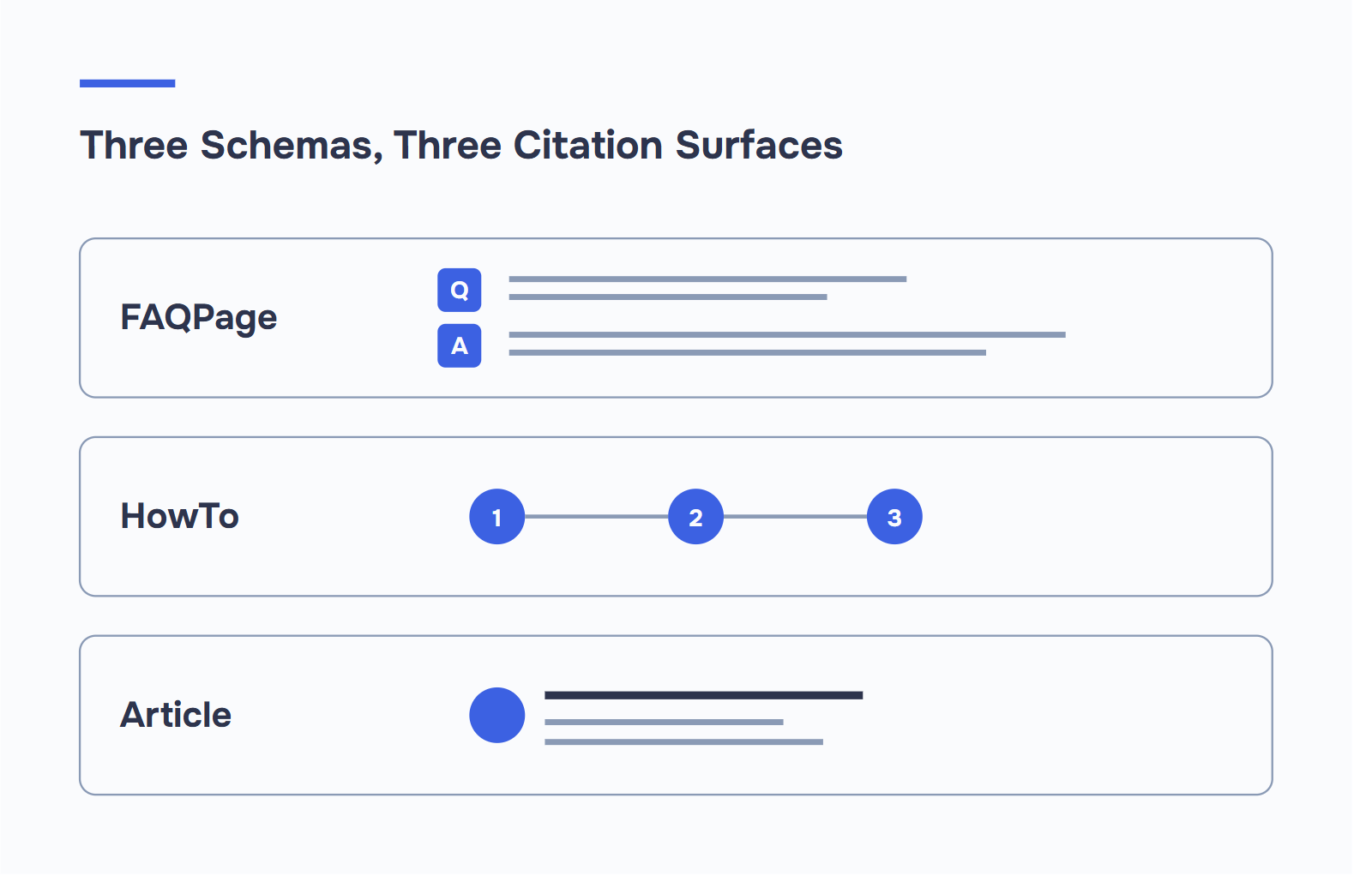
Schema markup is no longer a “nice to have.” It’s the layer that tells AI systems what your content actually is. Three schema types do the heavy lifting for AI Overview eligibility.
FAQPage Schema
Why it works: it pre-formats your content as question-answer pairs — exactly how AI systems extract and present information. When you implement FAQPage schema, you’re explicitly telling AI platforms what the question is, what the authoritative answer is, and how the elements relate. That removes interpretive burden.
Implementation tip: keep answers between 40–60 words for optimal extraction. Independent studies put FAQPage’s average lift on AI citation rates around 30%.
A minimal block looks like this:
{
  "@context": "https://schema.org",
  "@type": "FAQPage",
  "mainEntity": [{
    "@type": "Question",
    "name": "How do I get cited in Google AI Overviews?",
    "acceptedAnswer": {
      "@type": "Answer",
      "text": "Rank in the top 10 for the target query, use question-form H2s with direct-answer first sentences, and add FAQPage or HowTo schema that mirrors the visible content."
    }
  }]
}
Drop it in your page’s <head> as a <script type="application/ld+json"> block, then validate with Google’s Rich Results Test before shipping.
HowTo Schema
Why it works: it maps step-by-step instructions in a sequence AI can interpret instantly. AI Overviews frequently cite 3–7 step procedures, making this schema type particularly valuable for technical content.
Implementation tip: use numbered steps, not buried paragraphs. The schema mirrors what the AI is going to render anyway — make them match.
Article Schema (with Author Attribution)
Why it works: it establishes the content as editorial, attaches an author entity, and connects to an Organization. Article schema identifies content type; FAQPage enables Q&A extraction; HowTo schema maps step-by-step instructions. Together they cover most of what an AI Overview will surface.
Implementation tip: always include author, datePublished, dateModified, and publisher. Pages without these are systematically deprioritized.
Together, these three schema types are the difference between being cited and being invisible. One caveat: schema only works when it matches what’s actually on the page. Marking up FAQs that aren’t visible to users gets you penalized, not promoted.
Technical Factors: Page Speed, HTTPS, Mobile, and Crawlability
Before any signal can matter, an AI crawler has to reach your page. This sounds obvious. It is also where a surprising number of sites quietly disqualify themselves.
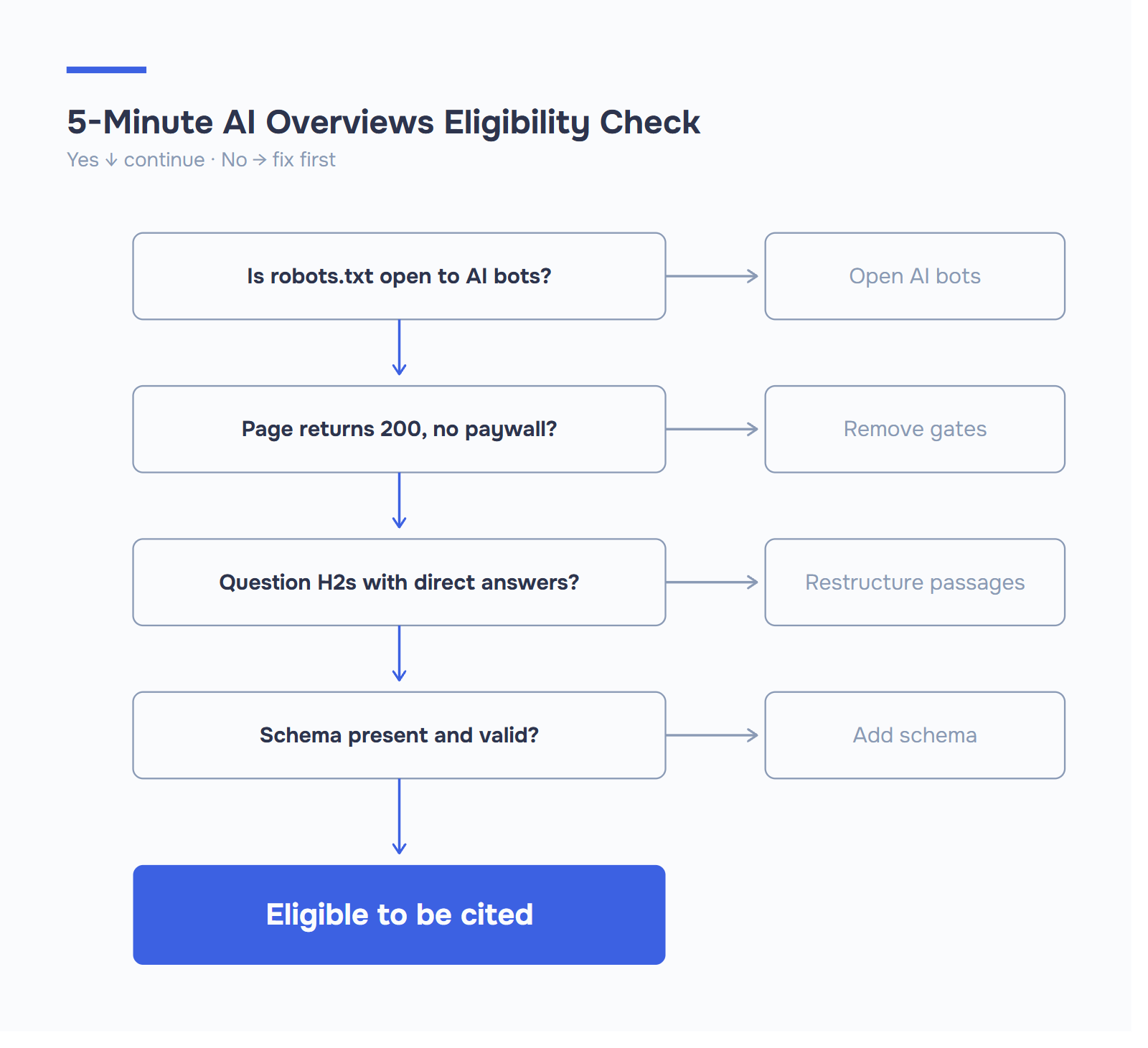
If a bot can’t fetch your URL, nothing else on this list helps. Pages need to return a clean 200 status code, load without authentication walls, and remain reachable during both training crawls and real-time grounding.
The non-negotiable technical baseline:
- HTTPS everywhere. Non-secure pages are systematically deprioritized across every AI surface.
- Mobile-first rendering. Google indexes the mobile version. If your mobile layout collapses your tables or hides your FAQs behind tap-to-expand, the AI sees the collapsed version.
- Core Web Vitals in the green. LCP under 2.5s, INP under 200ms, CLS under 0.1. Slow pages get crawled less frequently and re-grounded less often — and on AI Overviews, where freshness matters, less frequent crawling means stale citations.
- Server-rendered HTML for critical content. If your answer paragraphs only appear after JavaScript hydration, assume some crawlers won’t see them.
- Open crawler access. This is the one most sites get wrong.
In 2026, “accessible” means accessible to a dozen different user agents. A clean robots.txt that explicitly welcomes AI bots is now baseline. Here’s a configuration that allows AI search citation without permitting model training:
# Allow AI search crawlers
User-agent: OAI-SearchBot
Allow: /
User-agent: PerplexityBot
Allow: /
User-agent: Google-Extended
Allow: /
User-agent: ClaudeBot
Allow: /

# Disallow training-only crawlers (optional, based on policy)
User-agent: GPTBot
Disallow: /
User-agent: CCBot
Disallow: /
Perplexity respects robots.txt directives, and PerplexityBot won’t index any site that disallows it. So if PerplexityBot is blocked — accidentally or otherwise — you’re invisible to Perplexity citations. OAI-SearchBot works the same way for ChatGPT SEO — block it and you drop out of ChatGPT’s cited answers entirely.
What to Avoid: Thin Content, Paywalls, Conflicting Info
AI Overviews aggressively filter out content that can’t be trusted to be complete, consistent, or accessible. A few patterns get pages silently excluded:
- Thin content. Pages that only restate the question without answering it, or that pad with affiliate fluff before reaching the substance, almost never appear in cited sources. A 600-word post that spends 400 words on “what is X” framing before getting to the actual answer loses to a 600-word post that answers in paragraph one.
- Paywalls and login gates. If the AI crawler hits an authentication wall, the page is treated as inaccessible. Soft paywalls (preview + CTA) are fine; hard paywalls disqualify you.
- Conflicting information across the site. Your homepage says “founded in 2018,” a blog post says “we’ve been around since 2017,” the About page says “over five years.” The AI deprioritizes all three. Entity consistency — across dates, claims, and product descriptions — matters more than people realize.
- Stale content. Pages not updated quarterly are roughly 3× more likely to lose citations. AI Overviews favor fresh signals.
- Missing E-E-A-T signals. Google’s E-E-A-T framework has effectively become a ranking filter, not just a quality guideline. Pages with strong E-E-A-T indicators show noticeably higher visibility in AI-generated results.
- Vague authorship. Pages with no author byline, no bio, and no link to an author entity look like they could be generated by anyone — including, ironically, by AI.
- Misaligned schema. Marking up content that doesn’t exist on the page is worse than no schema at all. The most common version: FAQPage schema with questions and answers that aren’t actually visible to a reader anywhere on the page. Rich Results Test flags it, and the citations dry up shortly after.
The pattern across all of these: AI Overviews cite only what they can verify. Anything that creates ambiguity is treated as a risk signal.
Monitoring: How to Track Appearances in AI Overviews
You can’t optimize what you can’t measure — and AI Overview tracking is harder than traditional rank tracking. The data is fragmented across Google Search Console, third-party tools, and manual checks. Here’s the honest landscape.
Google Search Console
GSC has added partial visibility, but with caveats. The updated Search Appearance filter now includes dedicated segments for AI Overviews and AI Mode queries, letting you see impressions, clicks, and CTR specifically from these AI-generated formats rather than having them folded into aggregate web search data.
To find it: Performance → Search Results → Search Appearance filter → “AI Overview.” That gives you impressions, clicks, CTR, and average position scoped to queries where you appeared inside an AI Overview, separated from the rest of your web search data.
What to look at:
- Impressions vs. clicks ratio. Appearing in an AI Overview generates large impression counts but significantly lower CTR than traditional listings. A sudden impression spike with flat clicks usually means an AI Overview is intercepting traffic.
- Query-level CTR drops. Queries where CTR collapsed but impressions stayed flat are likely now triggering AI Overviews above your listing.
- Pages with rising AI Overview impressions. These are your citation candidates. Audit their structure, schema, and freshness — that’s where small fixes have the biggest leverage.
Third-Party Tools
For citation-level tracking (the binary “was I cited or not?”), GSC isn’t enough. This is the gap SEO AI Overviews tools are built to fill — Semrush, Ahrefs, and SISTRIX have features to track when and where AI Overviews appear for specific keywords. Cross-referencing this with GSC data is the best free-ish way to estimate impact.
Dedicated AI visibility platforms (Otterly, OmniSEO, Wellows, and others) go further by polling AI engines directly and recording whether your domain shows up across Google AI Overviews, Perplexity, ChatGPT Search, and Gemini.
Manual Spot-Checks
The least scalable method, also the most reliable. Pick 20–30 target queries. Run them in Google AI Overviews, Perplexity, ChatGPT Search, and Gemini. Record:
- Did your domain get cited?
- Which specific URL?
- What position in the citation list?
- Which competitor citations sit alongside yours?
A simple Google Sheet with those columns plus the date — updated monthly — beats most paid tools for understanding your actual citation patterns. You’re not looking for one bad week; you’re looking for which queries you systematically miss and which competitors keep taking your spot.
A Useful KPI Framework
Track these four metrics:
- Presence rate — % of your tracked queries where you appear as a citation
- Citation position — where in the citation list you sit (first source carries the most weight)
- Trigger rate — % of your tracked queries that trigger an AI Overview at all
- Competitor overlap — which domains are cited alongside you, and which are taking your spot
Check Whether You’re Actually Eligible
Most how to show up in AI overviews SEO advice focuses on content and structure work that compounds over months. The foundational question — can the bots reach your pages in the first place? — gets far less attention. And it can be answered in five minutes.
If PerplexityBot, OAI-SearchBot, or Google-Extended are blocked in your robots.txt, every other optimization in this guide is moot. Your content isn’t being indexed, it isn’t being cited, and you’re invisible to a channel that’s already nearly half of search.
Run a crawler access check on your domain. ICODA’s AI Visibility tool tests whether the major AI search bots can actually reach your pages — PerplexityBot, OAI-SearchBot, GPTBot, Google-Extended, ClaudeBot — and flags the schema and technical signals each bot uses to decide whether to cite you. Most sites we’ve audited find at least one accidental block they didn’t know they had.
The brands winning AI Overview citations in 2026 aren’t the ones with the biggest domains. They’re the ones whose pages are clean, structured, crawlable, and trustworthy — at the passage level, not just the page level. The work is doable. The question is whether you start now or after another quarter of CTR erosion.
Frequently Asked Questions (FAQ)
You need to rank in the top 10 — but not necessarily #1. Pages in positions 3–8 get pulled into AI Overviews regularly when their structure is cleaner than the top result’s. The AI picks the clearest extractable passage, not the strongest domain authority. Position 1 gives you roughly a 53% citation chance; position 10 gives you around 37%. That gap is real but not insurmountable.
Yes, and it’s one of the few places where small sites have a structural advantage. AI Overviews decompose queries into sub-questions via “query fan-out,” then pull the clearest answer for each fragment — regardless of domain size. A focused 600-word page that fully answers one narrow sub-query in a clean H2 block will beat a bloated enterprise page that buries the same answer in paragraph seven.
FAQPage schema has a measurable lift — independent studies put it around 30% on citation rates. It works because it pre-formats your content as question-answer pairs, which is exactly how AI systems extract and present information. That said, schema only works if it mirrors what’s actually visible on the page. Marking up FAQs that don’t exist in your HTML gets you penalized, not promoted.
Blocking PerplexityBot makes you completely invisible in Perplexity citations — it respects robots.txt directives strictly. For Google AI Overviews specifically, you need to check that Google-Extended and Googlebot are allowed. These are separate bots with separate rules, and it’s common to find accidental blocks from old robots.txt configs that predate AI crawlers. Run a crawler access audit before anything else — every other optimization is moot if the bots can’t reach your pages.
Almost certainly yes. When an AI Overview triggers for a query where you rank, GSC counts two impressions but only one click opportunity — and most users don’t click. The fingerprint is: impressions spike, clicks stay flat or fall, CTR collapses, average position holds or improves. Check the Search Appearance filter in GSC and filter by “AI Overview” to confirm which queries are doing this to you.
Share with


Rate the article