

It’s a mixed bag, and the honest answer depends on which claim you mean. The mechanical claims are demonstrated with real tests: JSON-LD gets stripped during live chatbot fetches, confirmed independently by two separate researchers using different methods. The “more schema equals more citations” claim is not demonstrated — the one controlled study on this found no meaningful lift and even a decline on Google’s AI Overviews for pages that already had strong citation history. So treat schema as good infrastructure hygiene for indexing and entity attribution, and be skeptical of anyone selling it as a direct citation-growth tactic with a guaranteed number attached.
What is schema markup in SEO? It’s structured data, usually written as JSON-LD, that describes a page’s content in a format machines can parse directly instead of inferring it from prose. Schema.org lists over 800 types, but for a practical schema markup SEO checklist aimed at AI visibility, three matter most: FAQPage, Article, and Organization. This guide skips the theory and gets straight to what to paste into your <head>, how to test it, and where the “schema equals citations” story gets more complicated than the SEO blogs let on.
Why These Three Schemas Matter More for AI Than Others
Schema markup for SEO is one piece of a broader AI SEO strategy: it works by giving machines a structured description of a page instead of leaving them to guess from prose. FAQPage, Article, and Organization matter most because together they answer the three questions every AI system needs answered before it can safely quote you: what is this page saying, who said it, and are they credible.
Article schema tells a crawler the headline, author, publish date, and body of a piece. Those are the basic facts a system needs before treating a page as a source rather than noise. Organization schema anchors that source to a real, identifiable entity, which matters because ChatGPT Search crawls web content alongside Bing’s index and uses structured data to identify authoritative sources, valuing Organization schema to correctly attribute information to specific brands. FAQPage schema packages a chunk of content into the question-and-answer shape AI assistants already output answers in — the closest match to a citable format that structured data offers.
That said, the “add schema, get cited” narrative deserves a real caveat. A May 2026 Ahrefs study, authored by Louise Linehan and Xibeijia Guan, tracked 1,885 pages that added JSON-LD schema between August 2025 and March 2026 and matched them against 4,000 control pages that didn’t, measuring citation changes across Google AI Overviews, AI Mode, and ChatGPT. No platform showed a meaningful citation increase after schema was added: AI Mode moved 2.4% and ChatGPT 2.2%, both too small to distinguish from random variation, while AI Overviews saw a statistically significant decline of about 4.6%, or roughly 12 fewer daily citations per page. One catch: every page in the dataset already had over 100 AI Overview citations before any schema was added. The study shows what happens to pages already in the AI consideration set — not whether schema helps a page get noticed for the first time.
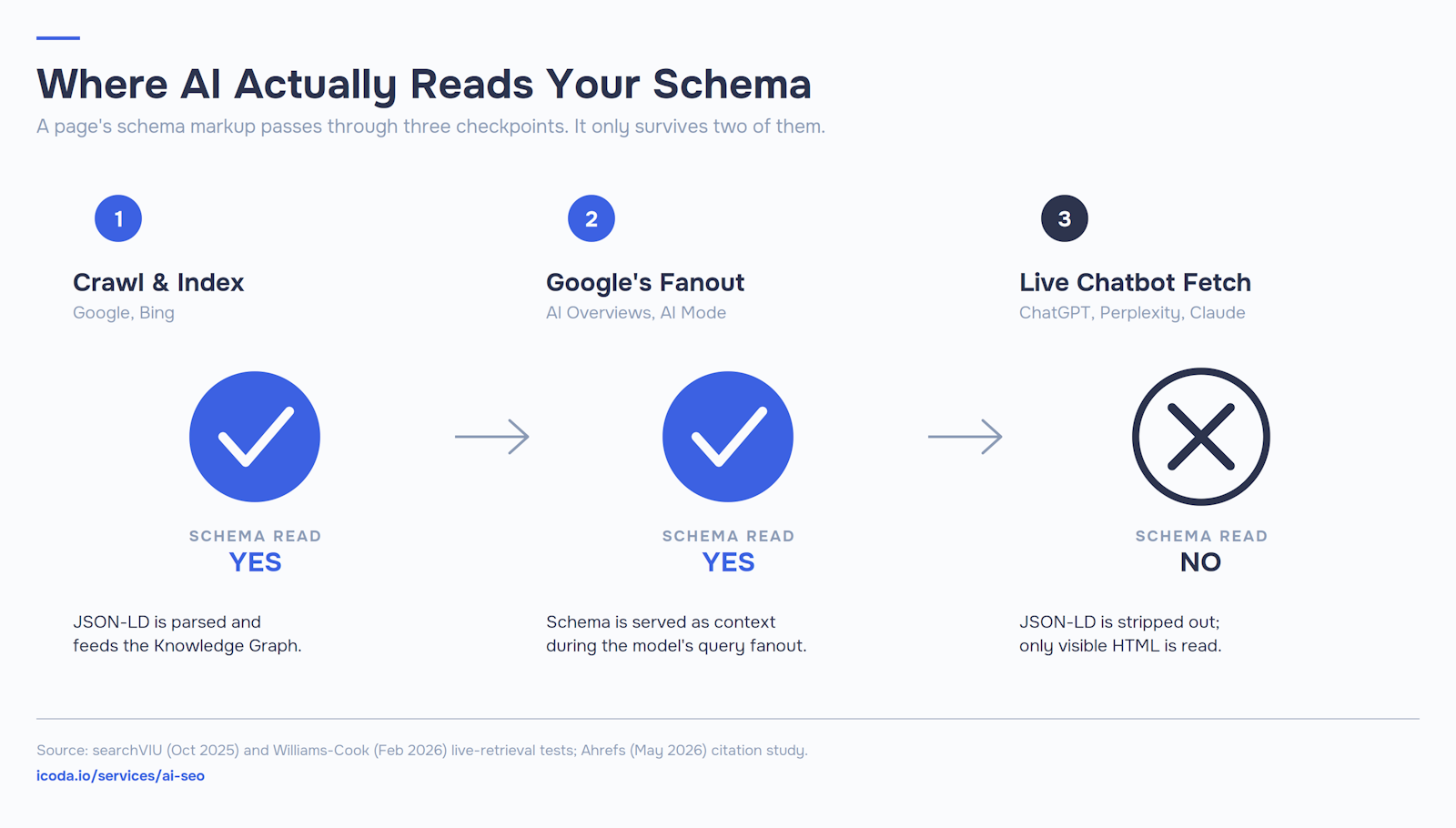
Part of the explanation is mechanical, and it’s been confirmed twice independently. A German technical SEO agency’s October 2025 test across five AI systems (ChatGPT, Claude, Perplexity, Gemini, Google AI Mode) found that when an assistant fetches a live page during standard retrieval, it strips the JSON-LD blocks and relies entirely on the visible HTML. A February 2026 test by researcher Mark Williams-Cook reached the same conclusion from a different angle: LLMs tokenize entire pages, including script tags, but do not semantically parse JSON-LD the way Google does. He proved it by hiding a fake address inside broken JSON-LD with no matching visible text. ChatGPT and Perplexity extracted and returned it anyway. Google’s own AI surfaces appear to be the exception. At an April 2026 Search Central event, a Google structured-data engineer said “schema is used as context served to models when doing fanouts,” which suggests AI Overviews and AI Mode may draw on schema upstream, during indexing, even while a chatbot’s live-browsing tool ignores it.
Schema markup is not a citation lever you pull directly with a chatbot’s live-browsing tool. Its real job is upstream: helping Google and Bing correctly classify, index, and attribute your content during crawling and entity resolution, which is also where several AI Overview and AI Mode surfaces draw on it. Ship FAQPage, Article, and Organization schema for that classification and attribution benefit, not on the promise of a guaranteed citation.
FAQ Page Schema: Implementation, Examples, and Testing
FAQPage schema marks up a set of questions and their answers so search engines and AI systems can extract them as discrete, quotable units. It’s the schema type most directly shaped like an AI-generated answer. That’s why it keeps showing up in structured-data checklists for GEO and AEO even after its search-results role shrank.
One update: Google announced on May 7, 2026 that FAQ rich results would no longer appear in Google Search, with support removed from Search Console and the Rich Results Test by June 2026. Don’t delete your FAQPage schema over this. It still helps classification, and the visible Q&A text it wraps is what LLMs extract directly from rendered HTML anyway.
Here’s a clean, copy-paste implementation:
{
  "@context": "https://schema.org",
  "@type": "FAQPage",
  "mainEntity": [
    {
      "@type": "Question",
      "name": "What is schema markup in SEO?",
      "acceptedAnswer": {
        "@type": "Answer",
        "text": "Schema markup is structured data, usually written in JSON-LD, that describes the content and meaning of a webpage in a format search engines and AI systems can parse directly, rather than inferring it from unstructured text."
      }
    },
    {
      "@type": "Question",
      "name": "Does FAQ schema still help after Google's 2026 rich results change?",
      "acceptedAnswer": {
        "@type": "Answer",
        "text": "Yes, indirectly. FAQ rich snippets no longer appear in Google Search, but the schema still helps classify page content, and the visible question-and-answer text it marks up is a format AI systems extract easily."
      }
    }
  ]
}
Implementation checklist:
- Match every
QuestionandAnswerto text that’s visible on the page — don’t mark up content a user can’t see. - Keep it to 3–8 focused questions per page; stuffing in dozens dilutes relevance and can read as spammy to Google’s quality systems.
- Phrase questions the way a person would type them into ChatGPT, not the way a marketer would title a section.
- Write full-sentence answers of 40–60 words. Short enough to quote, long enough to stand alone.
Testing: paste the JSON-LD into the Schema Markup Validator (schema.org’s own tool, since Google’s Rich Results Test is dropping FAQ support) to confirm syntax. Then check Search Console’s Enhancements report to make sure Google isn’t flagging errors on the live URL.
Article Schema: Implementation, Examples, and Testing
Article schema identifies a page as a piece of editorial content and declares who wrote it, who published it, and when. It’s the backbone property for E-E-A-T signals because it’s where authorship and freshness become machine-readable facts instead of things a crawler has to infer from a byline.
{
  "@context": "https://schema.org",
  "@type": "Article",
  "headline": "FAQ, Article, and Organization Schema: The Three Schemas AI Systems Use Most",
  "author": {
    "@type": "Person",
    "name": "Author Name",
    "url": "https://icoda.io/team/author-name"
  },
  "publisher": {
    "@type": "Organization",
    "name": "ICODA",
    "logo": {
      "@type": "ImageObject",
      "url": "https://icoda.io/logo.png"
    }
  },
  "datePublished": "2026-07-27",
  "dateModified": "2026-07-27",
  "mainEntityOfPage": "https://icoda.io/blog/faq-article-organization-schema",
  "image": "https://icoda.io/blog/images/schema-ai-seo-cover.png"
}
A few implementation notes that matter more than they look:
authorshould link to a real bio page with credentials, not just a name string. That’s the difference between a claimed author and a verifiable one.dateModifiedshould update on every meaningful revision. Freshness is one of the few Article properties Google ties explicitly to quality signals.- Use
Articlefor evergreen guides and reference content,BlogPostingfor informal or opinion-style posts, andNewsArticleif you’re an actual news publisher. All three are subtypes of the same parent, so picking the closer match helps disambiguation without changing the required fields. - Keep
headlineconcise. Google dropped its old 110-character hard limit years ago, but long titles can still get visually truncated on some surfaces.
Testing: run the URL through the Rich Results Test to confirm article eligibility and preview, then cross-check the Schema Markup Validator for full property-level validation, since the Rich Results Test only checks the subset of properties tied to rich results.

Organization Schema: Implementation, Examples, and Testing
Organization schema declares your brand as a distinct, verifiable entity rather than a name that happens to appear on a page. It’s the property AI systems and Google’s Knowledge Graph lean on to decide who’s actually behind the content they’re about to cite.
{
  "@context": "https://schema.org",
  "@type": "Organization",
  "@id": "https://icoda.io/#organization",
  "name": "ICODA",
  "url": "https://icoda.io",
  "logo": "https://icoda.io/logo.png",
  "sameAs": [
    "https://www.linkedin.com/company/icoda",
    "https://www.crunchbase.com/organization/icoda",
    "https://www.wikidata.org/wiki/Q000000"
  ],
  "knowsAbout": ["AI SEO", "Generative Engine Optimization", "Technical SEO"]
}
What each property is doing:
@idgives the entity a stable, referenceable identifier. That’s what lets you link Article and FAQPage schema back to the same organization node instead of repeating the whole block everywhere.sameAsconnects your entity to external identifiers Google already trusts. The more sameAs identifiers provided, and the more those sources agree on the organization’s details, the higher the entity confidence score in the Knowledge Graph.knowsAboutdeclares subject-matter expertise directly. An organization schema that declares knowsAbout SEO, content marketing, and analytics is more likely to be cited for queries in those domains than an equivalent organization with no topic declarations. Treat that as a reasonable signal to add, not a guaranteed ranking factor.- Reuse the exact same
name,logo, andsameAsset on every page. Inconsistency across pages is one of the fastest ways to weaken entity confidence.
Testing: validate through the Schema Markup Validator, then search your brand name on Google to check whether a Knowledge Panel is pulling the right logo, description, and profile links. That’s your real-world proof the entity has registered.
Advanced: Nesting Schemas and Common Validation Errors
Getting schema markup for SEO right doesn’t stop at the individual types. Nesting connects your FAQPage, Article, and Organization markup into one coherent graph instead of three isolated blocks that each make Google guess at the relationships between them. The standard way to do this is a single @graph array in one JSON-LD block, where each schema references the others by @id.
{
  "@context": "https://schema.org",
  "@graph": [
    { "@type": "Organization", "@id": "https://icoda.io/#organization", "name": "ICODA" },
    {
      "@type": "Article",
      "publisher": { "@id": "https://icoda.io/#organization" },
      "headline": "FAQ, Article, and Organization Schema"
    },
    {
      "@type": "FAQPage",
      "isPartOf": { "@id": "https://icoda.io/#organization" },
      "mainEntity": []
    }
  ]
}
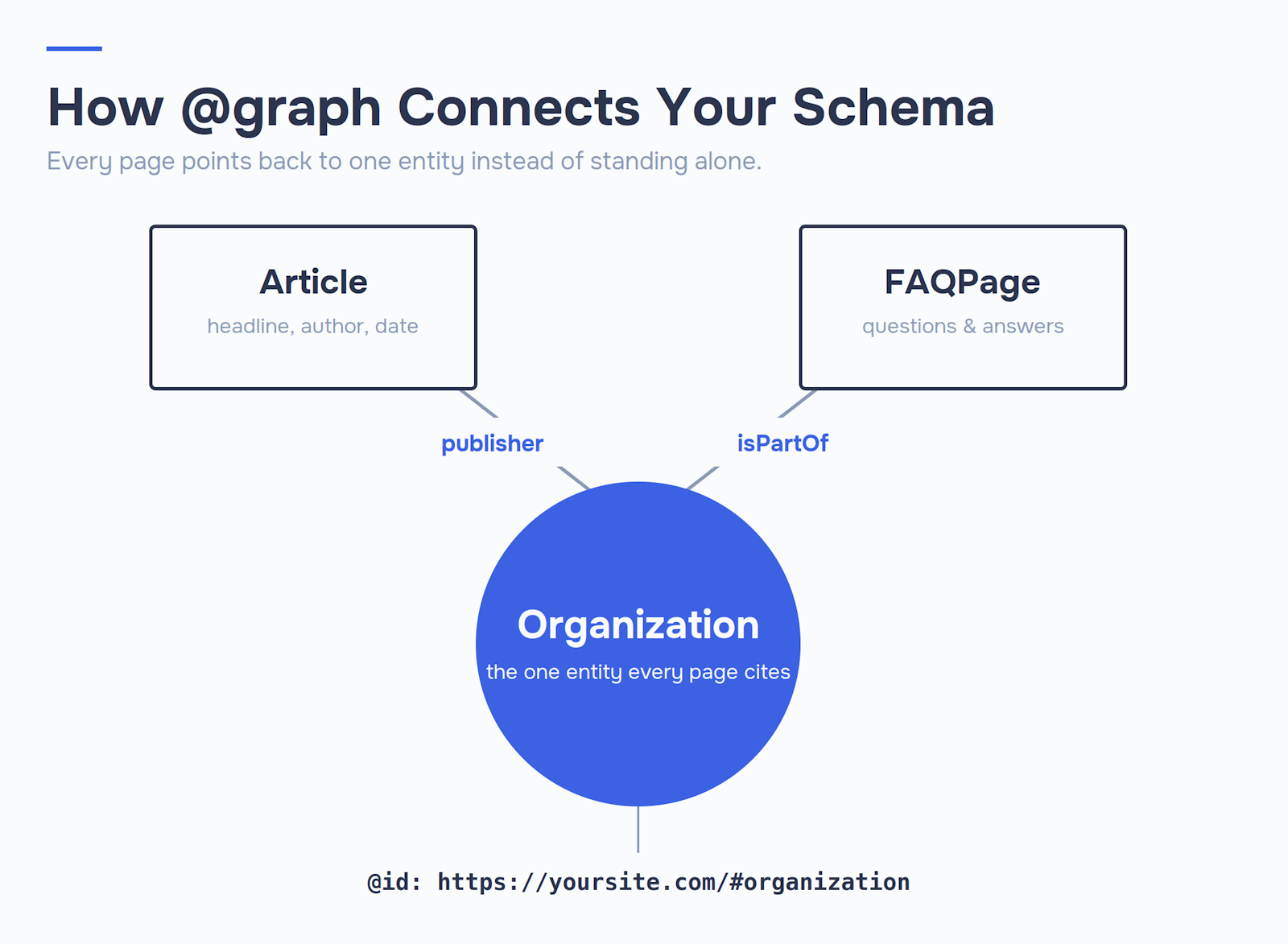
Here’s a quick side-by-side of the three schemas and where they fit:
| Schema | Primary job | Key properties | Google rich result | AI systems that reference it |
|---|---|---|---|---|
| FAQPage | Package Q&A content for extraction | mainEntity, Question, Answer | Removed from Search, May 2026 | ChatGPT, Perplexity, Google AI Overviews |
| Article | Identify content, author, and freshness | headline, author, datePublished, publisher | Yes, headline/image previews | ChatGPT Search, Google AI Overviews |
| Organization | Anchor content to a verified entity | @id, sameAs, knowsAbout, logo | Feeds Knowledge Panel | ChatGPT Search, Perplexity, Google Knowledge Graph |
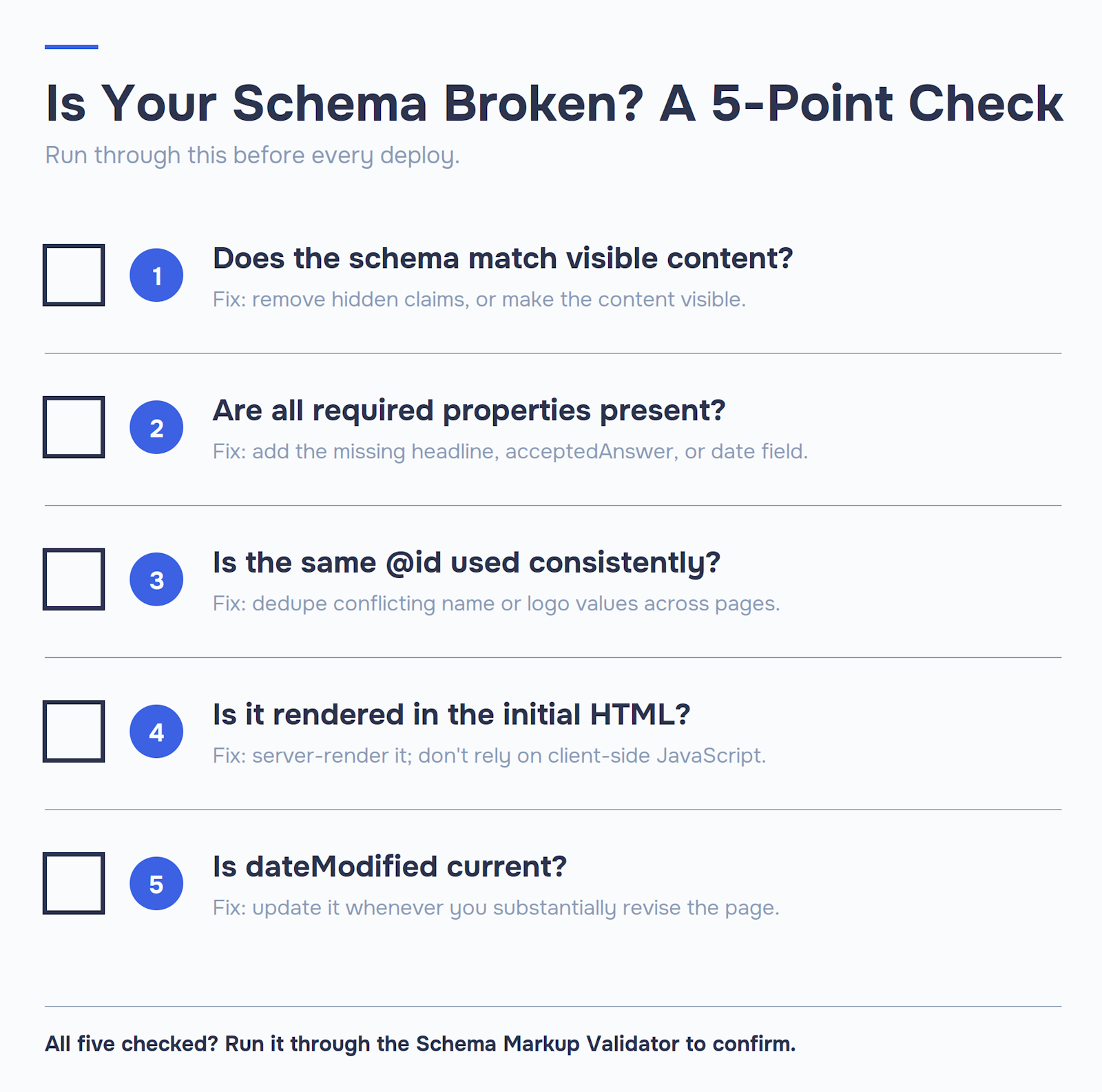
Common validation errors worth checking for on every deploy:
- Mismatched visible content. Schema describing an FAQ, price, or author that doesn’t appear anywhere on the rendered page. This violates Google’s guidelines and can suppress rich results sitewide.
- Missing required properties. FAQPage without
acceptedAnswer, Article withoutheadlineordatePublished: these throw hard errors, not warnings. - Duplicate or conflicting
@idvalues. If two pages declare the same Organization@idwith differentnameorlogovalues, you’re confusing entity resolution instead of strengthening it. - JSON-LD injected client-side only. If the script tag only appears after JavaScript runs, crawlers that don’t render JS won’t see it. Server-render it in the initial HTML whenever possible.
- Stale
dateModified. Leaving this frozen at the original publish date after a substantial rewrite understates freshness to systems that check it.
Check Your Schema Coverage
Reading about FAQPage, Article, and Organization schema is one thing. Knowing which of the three your own site is missing — and where the implementation is throwing silent errors — is another. That’s the fastest way to close schema markup SEO gaps before they cost you AI citations. ICODA’s AI visibility checker scans your site and shows exactly which schemas you have, which you don’t, and what’s broken in the ones you do.
Run your free AI visibility check →
Frequently Asked Questions (FAQ)
Schema doesn’t get you cited directly — a German agency test in October 2025 showed that when ChatGPT, Perplexity, and other assistants fetch a live page, they strip the JSON-LD and read the visible HTML instead. Google’s AI Overviews and AI Mode are the exception, since a Google engineer said schema feeds their fanout process upstream during indexing. So schema still matters for classification and entity attribution, just not as a lever you pull to win a chatbot citation. If you’re adding schema purely to chase ChatGPT mentions, you’re solving the wrong problem — the visible content quality is what gets pulled.
That’s consistent with what an Ahrefs study found in May 2026: pages that added JSON-LD schema saw no meaningful citation gain in AI Mode or ChatGPT, and AI Overviews citations actually fell about 4.6% on average. The catch is every page in that dataset already had over 100 AI Overview citations before adding schema — so the study says more about disturbing an already-working page than about schema being harmful in general. If your page was already ranking well and you added a pile of new markup right before the drop, correlation isn’t causation, but it’s worth checking your dateModified and mainEntity for anything that changed the page’s apparent freshness or structure. Don’t panic-remove it based on one dataset.
Yes, keep it, just recalibrate what you expect from it. Google removed FAQ rich results from Search in May 2026 and is pulling support from Search Console and Rich Results Test by June, but FAQPage is still a valid schema.org type and doesn’t hurt anything sitting unused on the page. The real value now is that the visible Q&A text underneath the schema is already shaped the way LLMs extract answers — the schema is just bookkeeping on top of content that was going to work anyway. If you only added FAQ schema for the SERP dropdown and the questions are filler, that’s the one case where ripping it out makes sense.
Because “AI” isn’t one system, and the tests measured different things. Mark Williams-Cook’s February 2026 test hid a fake address in broken JSON-LD with no matching visible text, and ChatGPT and Perplexity pulled it out anyway — meaning they tokenize the script tag as text but don’t semantically parse it as structured data. That’s different from Google’s AI surfaces, which appear to use schema during indexing rather than at live-fetch time. So “AI reads schema” is true for Google’s AI Overviews in a narrow, upstream sense, and false for a chatbot’s live browsing tool. Both claims get repeated as if they’re universal, and neither is.
Put the Organization block on every page, referencing the same @id rather than repeating the full object. The whole point of @id is letting your Article and FAQPage schema point back to one stable entity node instead of forcing Google to reconcile a dozen slightly different Organization declarations across your site. Inconsistent name, logo, or sameAs values between pages actively weakens entity confidence rather than just being neutral. It’s a few extra lines of JSON-LD per page, not a redesign, so there’s no real reason to skip it anywhere.
The mechanism is entity resolution, not backlinks. Google’s Knowledge Graph increases entity confidence when more external identifiers point to the same organization and agree on the same details like name and logo. It’s not a ranking signal in the classic sense — it’s closer to identity verification, telling Google “these ten sources all agree this is the same company.” If your sameAs links are outdated, use a different logo, or point to a dead Crunchbase page, you’re working against yourself, since mismatches don’t just fail to help, they add noise to the resolution.
It matters a little, not a lot. All three are subtypes of the same parent schema and share the same required fields, so picking the “wrong” one won’t break validation. The value of picking correctly is disambiguation — Article for evergreen reference content, BlogPosting for informal or opinion pieces, NewsArticle only if you’re an actual news publisher, since Google treats that type differently for News-specific features. If you’re not sure, Article is the safe default for most content marketing and guides; don’t lose sleep reclassifying old posts unless you’re also doing a broader cleanup.
Two separate failure points get confused here. The Rich Results Test and Schema Markup Validator check syntax and whether Google’s crawler can parse the block — that’s a different question from whether an AI system’s live-fetch tool renders your JavaScript at all. If your JSON-LD is injected client-side after the page loads, crawlers that don’t execute JS never see it, full stop, regardless of what the validator says about the code itself. Server-render the script tag into the initial HTML if you want any assistant, AI or not, to reliably pick it up. Validating clean and being visible to every crawler are not the same test.
Share with


Rate the article