




If you’ve checked your server logs lately, you’ve probably seen GPTBot show up. Fewer people notice its quieter sibling, OAI-SearchBot, sitting right next to it, doing a different job. Confusing the two is the most common mistake in AI robots.txt setups, and it’s quietly costing sites their ChatGPT citations without anyone realizing why.
The two crawlers split cleanly along one line: training versus search. Get that line wrong in robots.txt, and you can lose citations you never meant to give up.
GPTBot vs OAI-SearchBot: Two Different OpenAI Crawlers
GPTBot and OAI-SearchBot are separate crawlers with separate jobs: GPTBot gathers content for training OpenAI’s models, while OAI-SearchBot indexes pages so ChatGPT can retrieve and cite them in search answers. Treating them as one “OpenAI bot” is where most robots.txt files go wrong.
OpenAI runs a small family of user agents, and the split between training and search is deliberate. According to OpenAI’s own crawler documentation, each setting is independent: a webmaster can allow OAI-SearchBot to appear in search results while disallowing GPTBot to keep content out of model training. That’s the whole strategic puzzle most SEO teams miss.
Anthropic runs the same three-way split with ClaudeBot, Claude-User, and Claude-SearchBot.
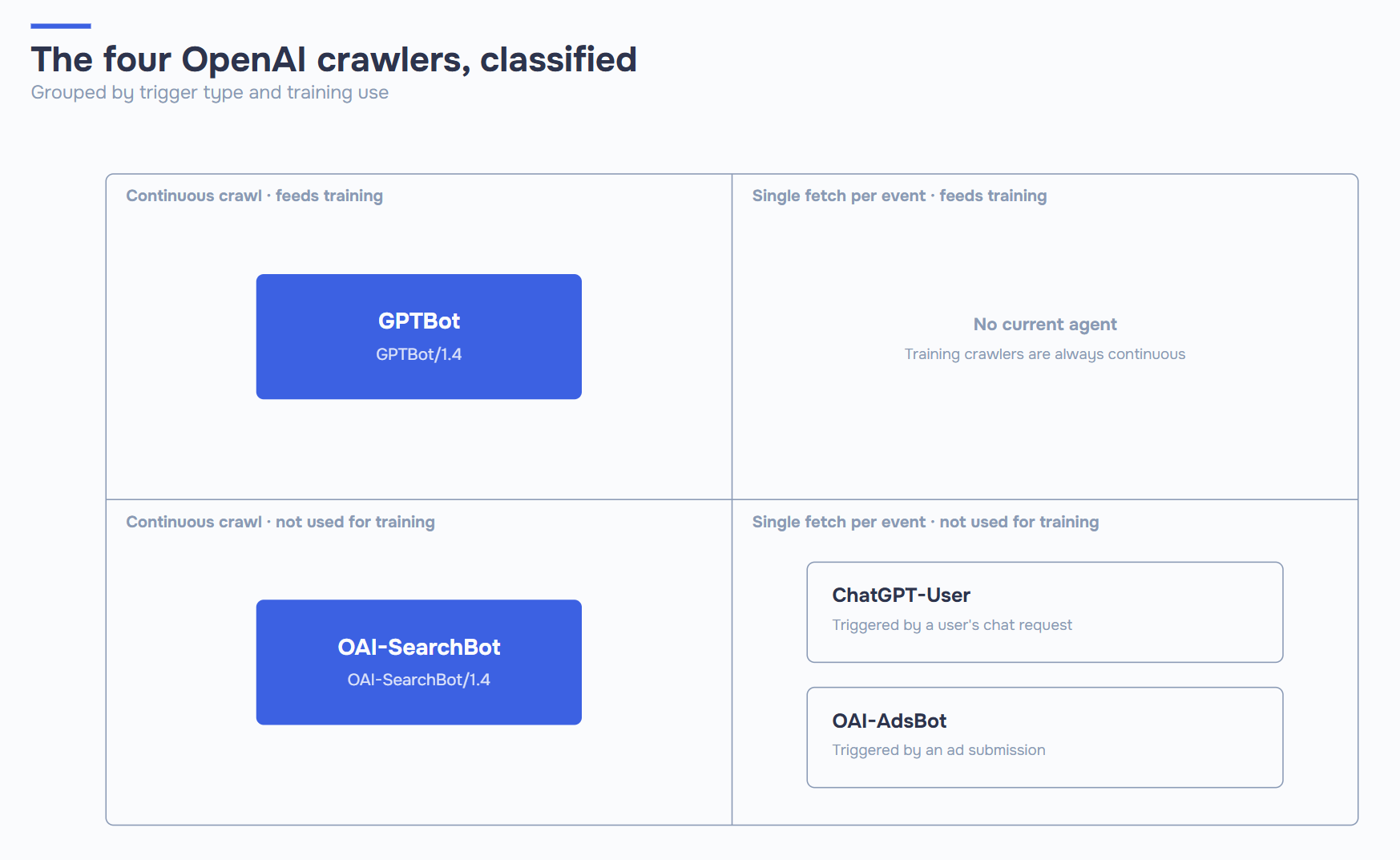
There are actually four OpenAI agents worth knowing, not two:
- GPTBot: bulk crawler feeding OpenAI’s training pipeline.
- OAI-SearchBot: indexes pages specifically for ChatGPT’s search and citation features.
- ChatGPT-User: fires only when a live user asks ChatGPT to fetch a specific URL in real time.
- OAI-AdsBot: checks the landing pages of ads submitted to ChatGPT for policy compliance. It only visits pages submitted as ads, and per OpenAI’s documentation, its data isn’t used for model training either.
Most guides published in 2023–2024 only mention GPTBot, because OAI-SearchBot didn’t exist yet. If your robots.txt hasn’t been touched since then, there’s a good chance it’s silently blocking the exact crawler responsible for getting you cited in ChatGPT today.
What Each Crawler Does, and Why It Matters
GPTBot collects web content that may be used to train and improve OpenAI’s generative AI models. OAI-SearchBot builds the real-time index that powers ChatGPT’s search and citation features, and it isn’t used for training at all. The practical difference: one affects what the model knows long-term, the other affects whether you show up right now.
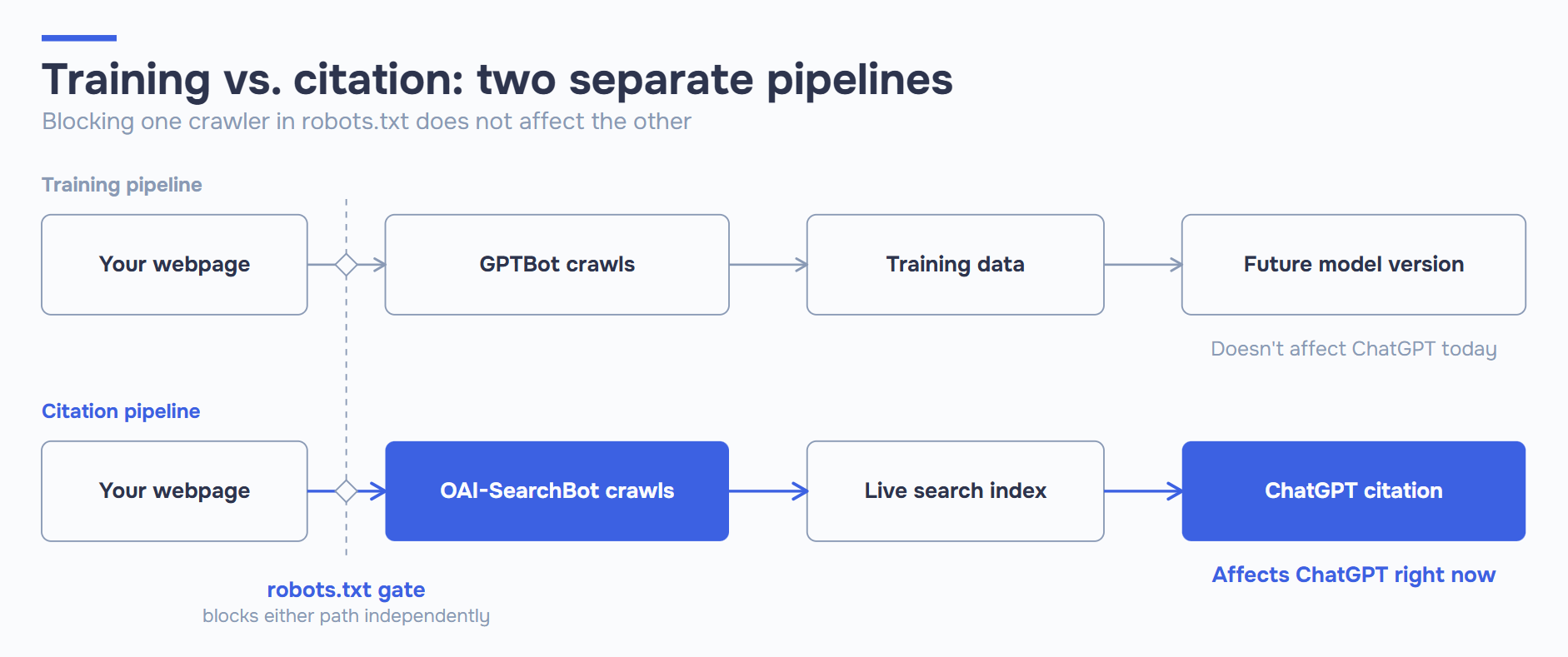
GPTBot (current user agent: GPTBot/1.4, full string: Mozilla/5.0 AppleWebKit/537.36 (KHTML, like Gecko); compatible; GPTBot/1.4; +https://openai.com/gptbot) exists to feed OpenAI’s training pipeline, and nothing else. Block it, and your content won’t train future models. It has no effect on ChatGPT search; that’s a separate system.
OAI-SearchBot (current user agent: OAI-SearchBot/1.4; its full string is longer than GPTBot’s, using a Chrome-style prefix: Mozilla/5.0 (Macintosh; Intel Mac OS X 10_15_7) AppleWebKit/537.36 (KHTML, like Gecko) Chrome/131.0.0.0 Safari/537.36; compatible; OAI-SearchBot/1.4; +https://openai.com/searchbot) is younger, more targeted, and crawls to keep a fresh index for real-time answers. Blocking it doesn’t protect your IP from training. It removes you from ChatGPT’s answer surface, full stop. If your goal is AI search visibility, this is the crawler that matters. Version numbers on both agents change periodically, so match on the GPTBot or OAI-SearchBot substring rather than pinning to an exact version string.
ChatGPT-User (user agent: ChatGPT-User/1.0) is the odd one out. It’s not automated crawling at all. It fires only when someone types your URL into ChatGPT and asks the model to read it, or interacts with a Custom GPT via GPT Actions. OpenAI is direct about this: because these fetches are user-initiated, robots.txt rules may not even apply to them the way they do to automated crawlers. Blocking it is rarely useful. It can break a fetch the user explicitly asked for, and it isn’t the control point for search opt-outs anyway; that’s OAI-SearchBot’s job.
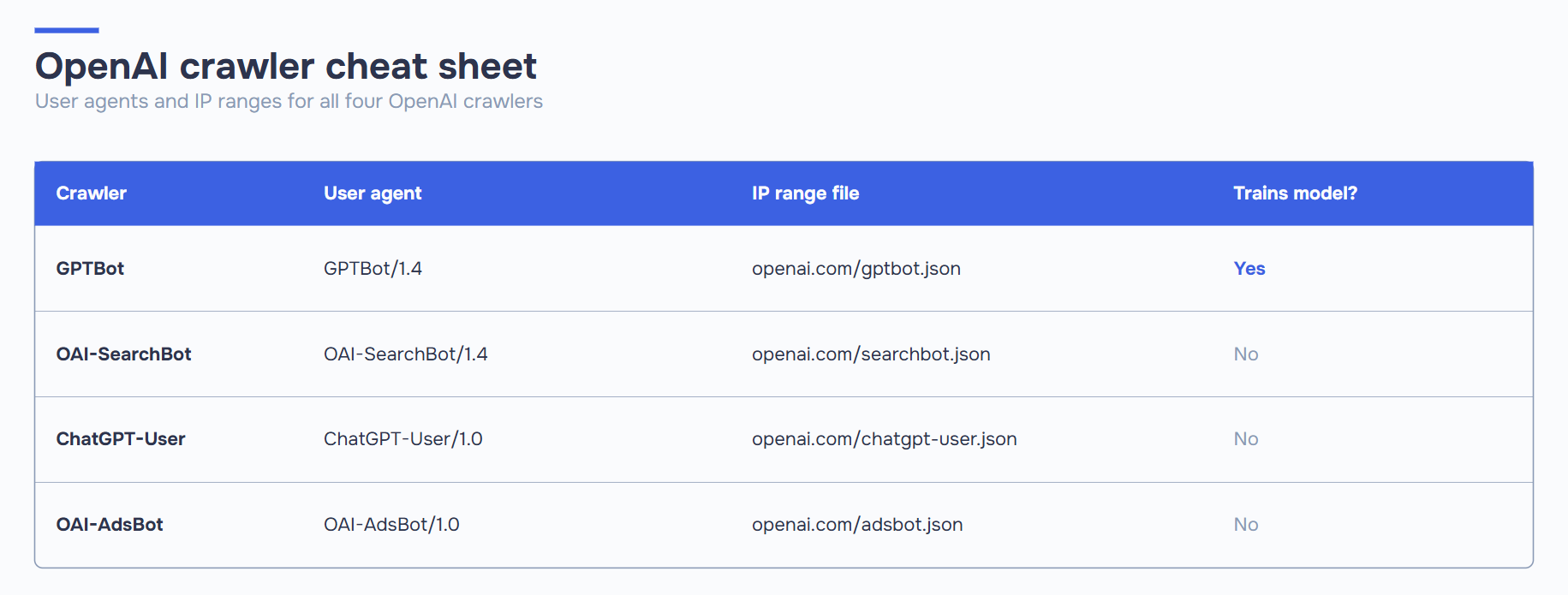
| Crawler | User Agent (core string) | Purpose | Used for Training? | Affects ChatGPT Citations? |
|---|---|---|---|---|
| GPTBot | GPTBot/1.4 | Bulk crawl for model training | Yes | No (indirect only) |
| OAI-SearchBot | OAI-SearchBot/1.4 | Real-time search indexing | No | Yes, directly |
| ChatGPT-User | ChatGPT-User/1.0 | User-triggered page fetch | No | No, robots.txt may not even apply |
| OAI-AdsBot | OAI-AdsBot/1.0 | Checks ad landing pages for policy compliance | No | No |
The takeaway: these are independent levers, not one switch. Pull them separately, and you control how OpenAI’s ecosystem interacts with your site.
robots.txt Configuration: Allow One, Block the Other
You configure GPTBot and OAI-SearchBot independently in the same robots.txt file, using separate User-agent blocks. Allowing one and disallowing the other has no effect on the other’s behavior. This is the config most content-driven sites should be running in 2026: stay eligible for citations, opt out of training.
Recommended setup for most publishers, visible in ChatGPT search, opted out of training:
# Allow ChatGPT search citations
User-agent: OAI-SearchBot
Allow: /

# Allow user-triggered fetches (someone pastes your URL into ChatGPT)
User-agent: ChatGPT-User
Allow: /

# Opt out of training data collection
User-agent: GPTBot
Disallow: /
Maximum AI visibility: allow both crawlers, accept that content may be used for training too:
User-agent: GPTBot
Allow: /

User-agent: OAI-SearchBot
Allow: /

User-agent: ChatGPT-User
Allow: /
Full opt-out: no citations, no training, typically reserved for paywalled or regulated content:
User-agent: GPTBot
Disallow: /

User-agent: OAI-SearchBot
Disallow: /

User-agent: ChatGPT-User
Disallow: /
Hybrid, path-level control. Many enterprise sites don’t make an all-or-nothing call. They open the blog and documentation, and lock down account areas and internal tools:
User-agent: GPTBot
Disallow: /account/
Disallow: /checkout/
Disallow: /internal-kb/
Allow: /

User-agent: OAI-SearchBot
Disallow: /account/
Disallow: /checkout/
Disallow: /internal-kb/
Allow: /
A few things worth knowing before you ship any of these:
- robots.txt is a request, not an enforcement mechanism. Well-behaved crawlers honor it, but it carries no legal weight on its own.
- Expect roughly 24 hours for OpenAI’s systems to reflect a robots.txt change in search-facing behavior.
- Directory-level rules only work if they sit under the correct
User-agentblock. A strayAllow: /under the wrong agent undoes your intent.
OpenAI isn’t the only operator with split agents. The complete list of AI crawlers has the robots.txt token for every major bot, including PerplexityBot, Google-Extended, and Bytespider.
Verification: IP Ranges and Crawl Patterns
You verify a crawler claiming to be GPTBot or OAI-SearchBot by checking the request against OpenAI’s published IP ranges, not by trusting the user-agent string alone. User agents can be spoofed; IP ranges are much harder to fake. OpenAI publishes machine-readable JSON files for each agent specifically so this check can be automated.
The published ranges live at predictable URLs:
openai.com/gptbot.json(GPTBot’s ranges)openai.com/searchbot.json(OAI-SearchBot’s ranges)openai.com/chatgpt-user.json(ChatGPT-User’s ranges)
A practical verification workflow looks like this:
- Search server access logs for the relevant substring (
GPTBot,OAI-SearchBot,ChatGPT-User). - Pull the requesting IP from each matching log line.
- Cross-reference that IP against the matching JSON range file.
- Flag any request that claims to be an OpenAI crawler but doesn’t match a published range. That’s a spoofed or unrelated bot, not OpenAI.
One detail that trips up log audits: when GPTBot or OAI-SearchBot fetch the robots.txt file itself, OpenAI’s documentation notes they may append an extra robots.txt marker to the user-agent string, specifically so that logs without full path data can still tell a robots.txt check apart from a regular page fetch. If you’re grepping logs by user-agent alone, account for that marker or you may double-count or miscategorize requests.
On crawl patterns: OpenAI has stated that if a site allows both GPTBot and OAI-SearchBot, it may reuse the results of a single crawl for both purposes rather than crawling the same pages twice. Identical crawl footprints for both agents don’t necessarily mean two separate passes. Don’t read crawl volume as a proxy for which agent is “more aggressive.” Check which agent is actually hitting your logs, and match those IPs against the published ranges.
Impact on ChatGPT Citations
Blocking OAI-SearchBot removes your content from ChatGPT’s search answers, even if GPTBot already crawled and trained on the same pages elsewhere. Per OpenAI’s documentation, an opted-out site won’t show up in cited search answers, though it can still surface as a plain navigational link. The opt-out affects citation-grade inclusion, not every mention. That breaks an old assumption: “if the AI already knows about my site, I’m covered.” In 2026, knowing and citing are separate systems.
A few consequences worth internalizing:
- A site can be “known” to the model and still invisible in search answers. Training data and the live citation index don’t talk to each other.
- Allowing GPTBot has no bearing on whether you’re cited today. Training affects a future model version, not this week’s ChatGPT search results.
- A robots.txt file inherited from a 2023 template is a common, invisible cause of missing citations. OAI-SearchBot didn’t exist when many of those files were written, so it often gets caught by a blanket “block all OpenAI bots” rule that predates it.
- Path-level blocking still applies. If OAI-SearchBot is allowed site-wide but blocked on your best long-form content, that content won’t surface in ChatGPT answers, no matter how strong it is.
If your content strategy depends on AI search visibility, and for most competitive niches in 2026, it increasingly does, OAI-SearchBot access is not optional. It’s the single configuration line that determines whether your best work has a chance to be cited at all.
Check Your Own AI Visibility Setup
Reading a checklist is one thing; knowing whether your own site is configured correctly is another. Misconfigured robots.txt rules, orphaned “block all AI” templates, and path-level mistakes are common enough that guessing isn’t a reliable strategy.
ICODA’s AI Visibility tool checks exactly this: whether your site is reachable by OAI-SearchBot and the other crawlers that determine AI citation eligibility, and where the gaps are. If GPTBot and OAI-SearchBot have been one undifferentiated line in your robots.txt file, it’s worth five minutes to confirm you’re not accidentally opting out of citations you want.
Frequently Asked Questions
No, blocking GPTBot has zero effect on Google. OpenAI and Google run completely separate crawlers and separate systems, so a GPTBot disallow rule doesn’t touch your rankings. The only way you get burned is if you use a lazy User-agent: * block that catches Googlebot along with GPTBot. Check your robots.txt line by line — if GPTBot has its own dedicated block, you’re fine.
Robots.txt carries no legal weight, that’s true, it’s a request, not a lock. But OpenAI has been compliant with it in practice, and you can verify actual GPTBot or OAI-SearchBot traffic against their published IP ranges to confirm they’re respecting your rules. The real risk isn’t OpenAI ignoring robots.txt, it’s some other bot spoofing the user-agent string to get past filters that only check the name. If you want certainty, check IPs, not just the user-agent.
No, blocking it now only stops future crawls, it doesn’t erase what’s already baked into a trained model. Training happens in cycles, so anything GPTBot grabbed before you blocked it can still show up in model behavior for months or longer. If your goal is “get my old content out of ChatGPT’s training data,” robots.txt can’t do that retroactively. What it can do is stop new content from going in going forward.
Probably not, and blocking it usually backfires. ChatGPT-User only fires when an actual person pastes your URL into ChatGPT and asks it to read the page, so blocking it just breaks a fetch someone explicitly requested. It has nothing to do with training and it’s not the opt-out lever for search citations either, that’s OAI-SearchBot’s job. Save your blocking effort for GPTBot or OAI-SearchBot depending on what you’re actually trying to control.
Yes, that’s exactly what these two crawlers are built to let you do. Disallow GPTBot to opt out of training, and separately allow OAI-SearchBot so your pages stay eligible for citation in ChatGPT’s search answers. It’s not one switch, they’re independent settings in the same robots.txt file. The tradeoff is you’re trusting OpenAI’s separation to actually hold in practice, and OpenAI has stated the two systems don’t overlap, but you’re relying on their word for that.
Share with


Rate the article