




If you’ve been checking your server logs lately, there’s a good chance you’ve spotted a visitor called ClaudeBot. It’s not a customer. It’s not a hacker. It’s Anthropic’s web crawler — and it’s been quietly reading your website to help train one of the most advanced AI models on the planet.
Whether you run a SaaS product, an e-commerce store, a media site, or a blockchain project, understanding what ClaudeBot does (and doesn’t do) is no longer optional. As AI-powered search reshapes how users discover content, how you interact with these crawlers directly impacts whether your brand shows up in AI-generated answers — or vanishes from them entirely.
This guide breaks down everything you need to know: what ClaudeBot is, how it identifies itself, how to control its access with surgical precision, and why your decisions here could shape your brand’s AI visibility for years to come.
ClaudeBot vs. ClawdBot: They Are Not the Same Thing
ClaudeBot is Anthropic‘s official web crawler — a bot that collects publicly available content to train and improve the Claude family of AI models. ClawdBot (now rebranded as OpenClaw) was an open-source AI agent built by Austrian developer Peter Steinberger. They share nothing beyond a vaguely similar name.
The confusion is understandable. Steinberger originally launched his project as “Clawdbot” in November 2025, a personal AI assistant that could automate tasks across messaging platforms like WhatsApp, Telegram, and Discord. But Anthropic filed trademark complaints, and within two months the project was renamed — first to “Moltbot,” then to “OpenClaw” by the end of January 2026.
Here’s the key distinction:
- ClaudeBot is a web crawler. It reads your website’s pages to gather training data for Anthropic’s large language models. It shows up in your server logs with a specific user-agent string and respects robots.txt directives.
- OpenClaw (formerly ClawdBot/MoltBot) is an AI agent. It runs on a user’s device and performs tasks — sending emails, managing calendars, browsing the web — on behalf of a human operator. It does not crawl websites for training data.
If you see ClaudeBot in your access logs, that’s Anthropic. If someone mentions “ClawdBot” in a conversation about autonomous AI assistants, they’re talking about OpenClaw. Don’t confuse the two when configuring your robots.txt — blocking one has no effect on the other.
What Is ClaudeBot? Anthropic’s Training Crawler Explained
ClaudeBot is Anthropic’s primary web crawler, designed to collect publicly available content that may be used to train and improve generative AI models powering Claude. It systematically traverses the internet, following links and sitemaps to discover and download web pages.
Unlike traditional search engine crawlers such as Googlebot — which index pages so they can appear in search results — ClaudeBot gathers content specifically for machine learning purposes. The data it collects feeds into Anthropic’s model development pipeline, helping Claude understand language, context, and nuanced topics across every domain.
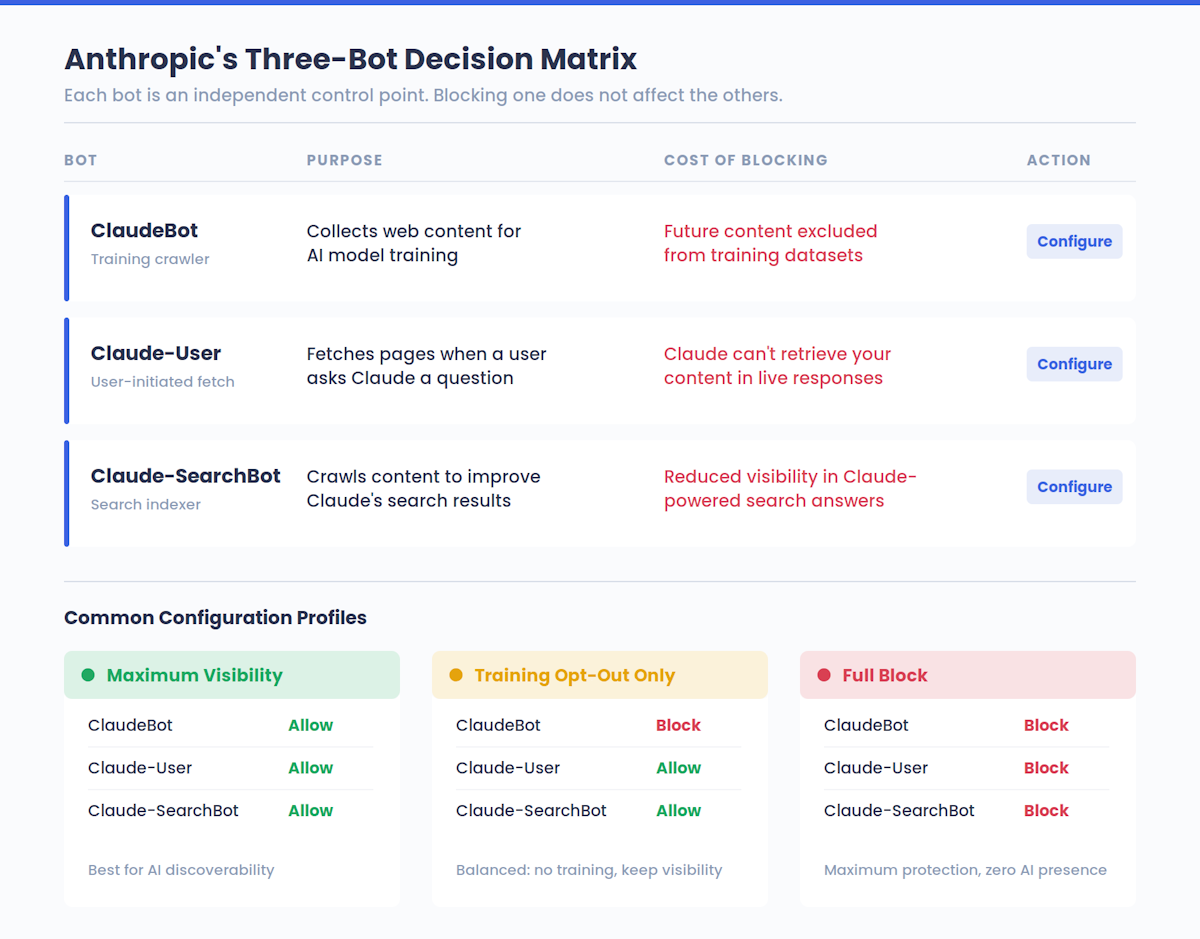
Anthropic actually operates three distinct bots, each with a different role:
| Bot Name | Purpose | What Blocking It Does |
|---|---|---|
| ClaudeBot | Collects web content for AI model training | Excludes your future content from training datasets |
| Claude-User | Fetches pages when a Claude user asks a question | Prevents Claude from retrieving your content in real-time responses |
| Claude-SearchBot | Crawls content to improve Claude’s search result quality | Reduces your visibility in Claude-powered search answers |
This separation matters. Blocking ClaudeBot from training on your content doesn’t prevent Claude users from seeing your pages in live answers — that’s handled by Claude-User. And blocking Claude-SearchBot doesn’t affect training. Each bot is an independent control point, giving website owners granular choices about how Anthropic interacts with their content.
That third column has real strategic consequences — we’ll unpack the full visibility trade-offs later in this guide. But the short version: most site owners have no idea where they currently stand with AI platforms. If you want a baseline before changing anything, check your AI visibility score to see how your brand appears across Claude and other AI systems right now.
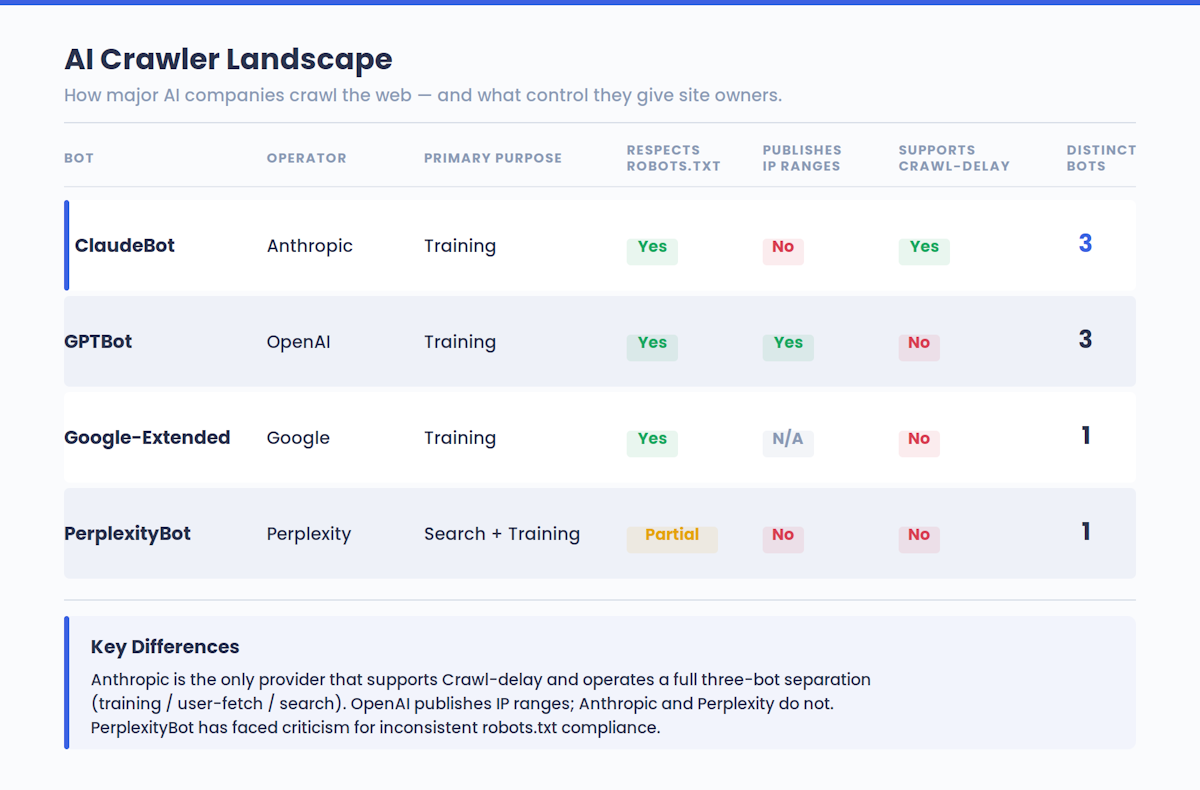
Anthropic has stated that its crawling aims to be transparent and non-disruptive. The bots honor robots.txt directives, respect anti-circumvention technologies like CAPTCHAs, and support the non-standard Crawl-delay extension for rate-limiting.
ClaudeBot User-Agent String: How to Identify It in Your Logs
ClaudeBot identifies itself with the user-agent token ClaudeBot and includes a contact email in its full user-agent string. Here is the complete string you’ll see in your server access logs:
Mozilla/5.0 AppleWebKit/537.36 (KHTML, like Gecko; compatible; ClaudeBot/1.0; +claudebot@anthropic.com)
A few technical details worth noting:
- The user-agent token for robots.txt purposes is simply
ClaudeBot. That’s the string you reference in your directives. - Anthropic previously operated under the user-agent strings
Claude-WebandAnthropic-AI. Both are now deprecated. If your robots.txt still references these old strings, your directives are no longer effective against current Anthropic crawlers. - The other two bots use their own tokens:
Claude-Userfor user-initiated page fetches andClaude-SearchBotfor search indexing.
To quickly check if ClaudeBot has visited your site, run a grep against your access logs:
grep "ClaudeBot" /var/log/nginx/access.log
Or for Apache:
grep "ClaudeBot" /var/log/apache2/access.log
If you’re seeing hits from a user-agent claiming to be ClaudeBot, it’s worth verifying authenticity (more on IP verification below). User-agent strings can be spoofed, and bad actors sometimes impersonate legitimate crawlers to scrape content without restriction.
How to Allow or Block ClaudeBot in robots.txt
You control ClaudeBot’s access through standard robots.txt directives placed in your site’s root directory. This is Anthropic’s recommended method — and the only one they guarantee will work reliably.
Block ClaudeBot from your entire site
User-agent: ClaudeBot
Disallow: /
This tells ClaudeBot it cannot access any page on your domain. Anthropic states that when a site blocks ClaudeBot, it signals that the site’s future content should be excluded from AI model training datasets.
Allow ClaudeBot full access
User-agent: ClaudeBot
Allow: /
Or simply don’t include any ClaudeBot directive — the default behavior is to allow crawling.
Slow down ClaudeBot’s crawl rate
User-agent: ClaudeBot
Crawl-delay: 10
This asks ClaudeBot to wait 10 seconds between requests, reducing server load without blocking access entirely.
Block all three Anthropic bots at once
User-agent: ClaudeBot
Disallow: /

User-agent: Claude-User
Disallow: /

User-agent: Claude-SearchBot
Disallow: /
Important: Remember to apply these rules on every subdomain you want to protect. A robots.txt at example.com does not cover docs.example.com or blog.example.com.
Also, take a moment to audit your existing robots.txt for the deprecated strings Claude-Web and Anthropic-AI. If those are still in your file, they’re doing nothing against current Anthropic crawlers. Replace them with the three active bot names listed above.
Partial Access: Allow Your Blog, Block Your Admin
You don’t have to make an all-or-nothing decision — robots.txt supports path-level rules that let you open specific sections while keeping others locked down. This is the smart play for any business that wants AI training visibility for its public content but needs to protect sensitive areas.
Here’s a practical configuration that works for most sites — whether you’re running a SaaS platform, an online store, or a crypto project:
User-agent: ClaudeBot
Disallow: /admin/
Disallow: /dashboard/
Disallow: /api/
Disallow: /members/
Disallow: /internal/
Allow: /blog/
Allow: /docs/
Allow: /about/
Allow: /
In this setup, ClaudeBot can access your blog posts, documentation, and public pages — making that content available for AI training and increasing the chance that Claude references your brand in its responses. Meanwhile, admin panels, API endpoints, and member-only areas remain off-limits.
A few common partial-access patterns:
- E-commerce stores: Allow product pages, category pages, and buying guides; block cart, checkout, and account areas.
- SaaS platforms: Allow marketing pages, pricing, and docs; block app dashboards, settings, and API routes.
- Content publishers: Allow articles and category pages; block search results pages and user-generated content sections to avoid thin or duplicate content entering the training set.
- Crypto and Web3 projects: Allow documentation, blog, and protocol explainers; block admin panels, internal tooling, and gated community areas.
Remember that Allow and Disallow rules are evaluated by specificity — more specific paths take precedence. The directive Disallow: /admin/ will block /admin/settings even if a broader Allow: / exists.
How to Verify ClaudeBot’s IP Addresses
Anthropic does not publish a fixed list of IP ranges for its web crawlers, and the company advises against relying on IP-based blocking as your primary defense. Their bots operate through public cloud infrastructure, meaning IP addresses can change. Blocking IP ranges might also prevent the bot from reading your robots.txt, which could lead to unintended crawling behavior.
That said, Anthropic does provide a reference list for IP verification. If a crawler claims to be ClaudeBot and its source IP appears on Anthropic’s published list, that confirms the crawler is genuinely from Anthropic. You can find this list in Anthropic’s official support documentation.
For verifying individual requests, a reverse DNS lookup is your best tool:
# Step 1: Reverse DNS lookup on the crawler's IP
host 216.73.216.1

# Step 2: Forward DNS to confirm
host [result-from-step-1]
If the reverse DNS resolves to a domain associated with Anthropic (or its cloud infrastructure), the request is likely genuine. If it resolves to an unrelated domain or fails entirely, you may be looking at a spoofed user-agent — someone impersonating ClaudeBot.
For broader monitoring, consider these approaches:
- Server log analysis: Regularly parse your logs for
ClaudeBotentries and cross-reference IPs against Anthropic’s published list. - Bot detection platforms: Services like Known Agents (formerly Dark Visitors) and PlainSignal offer real-time agent analytics that can authenticate crawler visits and flag spoofed traffic.
- Reverse proxy rules: Tools like Cloudflare and Nginx allow you to create conditional rules that verify user-agent claims against known IP ranges before granting access.
The bottom line: use robots.txt as your primary control mechanism, and use IP verification as a supplementary authenticity check — not the other way around.
How ClaudeBot Affects Your AI Visibility
Every decision you make about ClaudeBot access directly impacts whether your brand appears in AI-generated answers — a channel that is rapidly becoming as important as traditional search. This is where technical crawler management meets growth strategy.
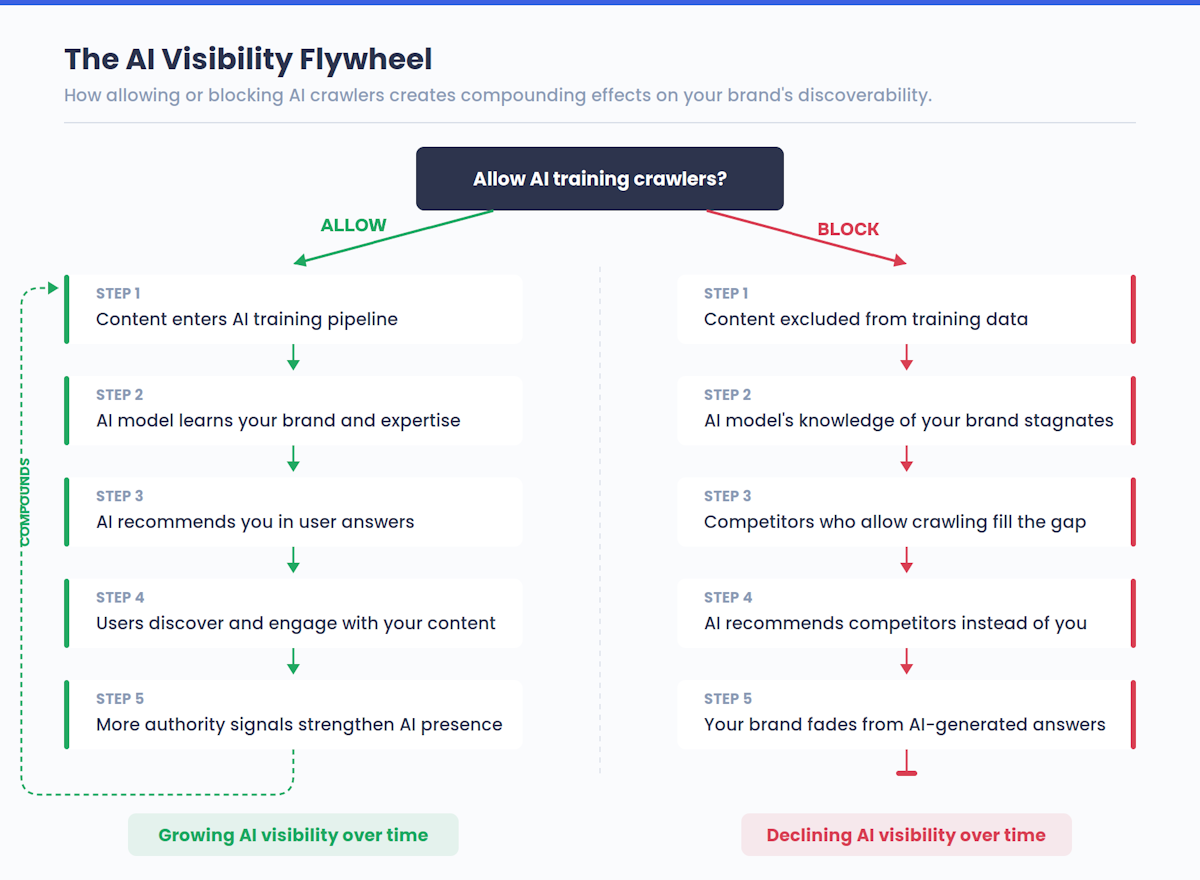
Here’s the trade-off in plain terms:
- Allow ClaudeBot → Your content enters Anthropic’s training pipeline. Claude becomes more likely to reference your brand, explain your product, or recommend your services when users ask relevant questions.
- Block ClaudeBot → Your future content is excluded from training. Claude’s knowledge of your brand stagnates at whatever was collected before the block. Over time, competitors who allow crawling gain a growing advantage in AI-generated recommendations.
This dynamic is playing out across the AI landscape, not just with Claude. OpenAI’s GPTBot, Google’s AI crawlers, and Perplexity’s bot all operate under similar logic. The sites that participate in AI training are the ones that get cited in AI answers.
The stakes are concrete across every industry:
- SaaS founders: When a prospect asks Claude “What’s the best project management tool for remote teams?”, the answer draws from what Claude has learned. If your docs, comparison pages, and feature breakdowns were part of that learning, you’re in the recommendation. If they weren’t, your competitor is.
- E-commerce operators: A shopper asking “What’s the best running shoe for flat feet?” gets an answer shaped by product pages and buying guides that Claude ingested. Brands that blocked the crawler don’t appear in that answer.
- Publishers and media sites: When users ask Claude to explain a trending topic, it synthesizes from sources it knows. If your reporting and analysis were in the training data, Claude cites your framing. If not, someone else’s narrative dominates.
- Crypto and Web3 projects: When an investor asks “What are the best Layer 2 solutions?” or “How does [your protocol] work?”, the answer reflects what Claude has learned from protocol documentation and blog posts. If yours were excluded, you’re invisible to that audience.
In each case, the pattern is identical: the content Claude can access becomes the content Claude recommends.
The concept of AI visibility — how prominently and accurately your brand appears across AI-powered platforms — is emerging as a distinct discipline alongside traditional SEO. It requires its own audit, its own strategy, and its own monitoring. And unlike traditional SEO, where you can track rankings in Google Search Console, AI visibility has been a black box for most teams — until now.
Measure Before You Decide
The worst thing you can do is change your ClaudeBot configuration blindly. Before allowing or blocking any of Anthropic’s three crawlers, you need a baseline: How often does Claude mention your brand today? Does it describe your product accurately? Does it recommend competitors instead?
ICODA’s AI Visibility Tool answers these questions in minutes. It scans how your brand appears across major AI platforms — Claude, ChatGPT, Perplexity, Gemini — and gives you a clear picture of your current standing. Armed with that data, you can make informed decisions about which bots to allow, which to block, and which sections of your site to prioritize for AI discoverability.
Check your AI visibility score now →
Key Takeaways
Managing ClaudeBot is no longer a niche sysadmin task — it’s a strategic decision that affects your brand’s discoverability in the AI age. Here’s what to remember:
- ClaudeBot is Anthropic’s training crawler, separate from the OpenClaw agent (formerly ClawdBot/MoltBot) and from Claude-User and Claude-SearchBot.
- Use robots.txt as your primary control mechanism. Anthropic’s bots respect these directives reliably.
- Audit your robots.txt for deprecated strings (
Claude-Web,Anthropic-AI) and replace them withClaudeBot,Claude-User, andClaude-SearchBot. - Use partial access rules to share your public content while protecting sensitive areas.
- Don’t rely solely on IP blocking — Anthropic uses cloud infrastructure with changing IPs and doesn’t publish fixed crawler ranges.
- Measure your AI visibility first — use ICODA’s AI Visibility Tool to establish a baseline before making any crawler access changes.
- Think strategically: blocking AI crawlers protects your content but reduces your AI visibility. The best approach balances both concerns based on actual data.
The businesses that understand this balance — measuring their AI footprint, selectively sharing their best content with crawlers, and protecting what needs protection — are the ones that will dominate both traditional search and the AI-generated answer boxes of tomorrow.
Frequently Asked Questions (FAQ)
Crawling public pages requires no consent — the same rule applies to Googlebot. Add Disallow: / under User-agent: ClaudeBot in robots.txt and it stops immediately. If bandwidth is the issue rather than principle, Crawl-delay: 10 throttles frequency without blocking access.
Blocking ClaudeBot has no effect on Google rankings — it is Anthropic’s crawler, entirely separate from Google’s infrastructure. The real trade-off is AI visibility: content excluded from ClaudeBot’s index won’t appear in Claude’s answers. That’s a different problem from SEO, but an increasingly important one.
Authentic ClaudeBot identifies as ClaudeBot/1.0 with claudebot@anthropic.com in the user-agent string. Verify by running a reverse DNS lookup on the source IP — it should resolve to Anthropic-associated infrastructure. Anthropic also publishes a reference IP list in their official docs.
Each bot serves a distinct purpose: ClaudeBot collects training data, Claude-User fetches pages for live answers, Claude-SearchBot powers their search feature. Blocking only ClaudeBot stops training but leaves the other two active. To cut off Anthropic entirely, all three need explicit Disallow rules.
A blanket block opts you out of AI-generated recommendations entirely. When users ask Claude or ChatGPT “what’s the best tool for X”, answers draw from what the models learned — sites that blocked crawlers don’t appear. Selective blocking by path is usually smarter than an all-or-nothing decision.
Path-level robots.txt rules handle this exactly. Use Disallow: /dashboard/ and Disallow: /api/ alongside Allow: /blog/ — more specific paths take precedence. Note: a robots.txt at example.com does not cover app.example.com; subdomains need their own file.
It’s worth five minutes of attention. AI-generated answers are a real and growing discovery channel — your robots.txt stance determines whether your content appears in them. The mistake isn’t choosing to block or allow; it’s having no deliberate position at all.
Share with


Rate the article