




Something strange started happening to marketing dashboards in late 2024. A trickle of visitors began arriving from domains nobody had optimized for — chatgpt.com, perplexity.ai, gemini.google.com. By 2026, that trickle has become a measurable stream, and for some niches, a flood. Yet Google Analytics 4 still lumps most of it under “Referral” or, worse, “Direct,” leaving marketers guessing how much traffic their content actually earns from large language models.
This guide shows you exactly how to surface AI referral traffic in GA4 — with the regex patterns, custom channel groups, and exploration reports you need to stop flying blind.
Why Tracking AI Traffic Matters in 2026
AI referral traffic is the stream of visitors arriving at your website after clicking a citation, link, or recommendation generated by an AI platform like ChatGPT, Perplexity, Claude, or Google’s AI Overviews. Unlike traditional organic search, these users have already received a synthesized answer — meaning the ones who still click are unusually high-intent.
The problem: GA4’s default channel groupings were designed before generative AI existed. Without custom configuration, your analytics will misattribute this traffic or hide it entirely inside broader buckets. Fixing that is the first step toward understanding which content earns AI citations and converts the resulting visitors.
Which AI Platforms Send Identifiable Referral Traffic
Most major AI platforms now pass a standard HTTP referrer header when users click outbound links, making them trackable in GA4. The list of platforms sending identifiable AI chatbot traffic has grown quickly over the past year.
Here are the referral strings you’ll encounter most often:
- ChatGPT:
chatgpt.com,chat.openai.com - Perplexity:
perplexity.ai,www.perplexity.ai - Google Gemini:
gemini.google.com,bard.google.com(legacy) - Claude:
claude.ai - Microsoft Copilot:
copilot.microsoft.com,bing.com/chat - You.com:
you.com - Poe:
poe.com - Meta AI:
meta.ai - DuckDuckGo AI Chat:
duckduckgo.com/aichat
Google AI Overviews are the exception — they appear inside Google Search results and typically pass google.com as the referrer with no distinguishing parameter, which we’ll address in the limitations section.
Worth pausing on this list. Each platform ranks content differently — ChatGPT leans on training data and authoritative sources, Perplexity cites real-time search results, and Gemini blends Google’s index with its own retrieval layer. If you’ve never checked which surface your brand, the GA4 numbers you’re about to track will lack baseline context. A free AI visibility check shows which platforms cite you today — useful background before you configure channel groups.
Step-by-Step: Create an AI Referral Channel Group in GA4
To track AI referral traffic as its own channel in GA4, create a custom channel group that isolates AI source domains from standard referral traffic. This takes about 10 minutes and requires Editor-level access to your GA4 property.
Step 1: Open channel group settings. Navigate to Admin → Data display → Channel groups, then click Create new channel group.
Step 2: Name your group. Use something clear like “AI Traffic Channels” — this label will appear in every report that uses channel groupings.
Step 3: Add a new channel. Click Add new channel and name it “AI Chatbots” or “Generative AI.”
Step 4: Define the conditions. Select Source from the dimension dropdown, choose the matches regex operator, and paste the regex pattern from the next section.
Step 5: Prioritize the channel. Drag your new “AI Chatbots” channel to the top of the channel list. Order matters — GA4 applies rules top-down, and if “Referral” sits above it, your AI traffic will be classified as generic referral before it ever reaches your custom rule.
Step 6: Save and wait. Channel group changes apply to reports going forward. Historical data won’t retroactively reclassify, but you can still analyze it using explorations.
Regex Patterns That Capture AI Traffic
The following regex pattern captures traffic from all major AI platforms in a single GA4 rule:
chatgpt\.com|chat\.openai\.com|perplexity\.ai|gemini\.google\.com|bard\.google\.com|claude\.ai|copilot\.microsoft\.com|bing\.com/chat|you\.com|poe\.com|meta\.ai|duckduckgo\.com/aichat
If you want to segment by specific platforms for deeper analysis, use these individual patterns:
| Platform | Regex Pattern | Use Case |
|---|---|---|
| ChatGPT | chatgpt\.com\|chat\.openai\.com | Largest volume source for most sites |
| Perplexity | perplexity\.ai | High citation-to-click ratio |
| Claude | claude\.ai | Growing rapidly in enterprise segments |
| Gemini | gemini\.google\.com\|bard\.google\.com | Requires Bard legacy handling |
| Copilot | copilot\.microsoft\.com\|bing\.com/chat | Includes Bing chat traffic |
| All AI combined | Full pattern above | Top-level channel grouping |
A quick note on syntax: GA4 uses RE2 regex, so always escape literal dots with \. and use pipe characters (|) for OR conditions. Test your patterns in the GA4 filter preview before saving — a single unescaped character can silently exclude thousands of sessions.
Build a Custom Exploration Report for AI Traffic
A custom exploration in GA4 lets you analyze AI referral traffic far beyond what standard reports show. Here’s how to build one that actually answers business questions.
Open Explore → Blank exploration and configure it as follows:
- Dimensions: Session source, Landing page, Device category, Session default channel group
- Metrics: Sessions, Engaged sessions, Average engagement time, Conversions, Total revenue
- Filter:
Session source matches regex→ paste your AI regex pattern - Visualization: Free-form table for drilldowns, or line chart for trend analysis
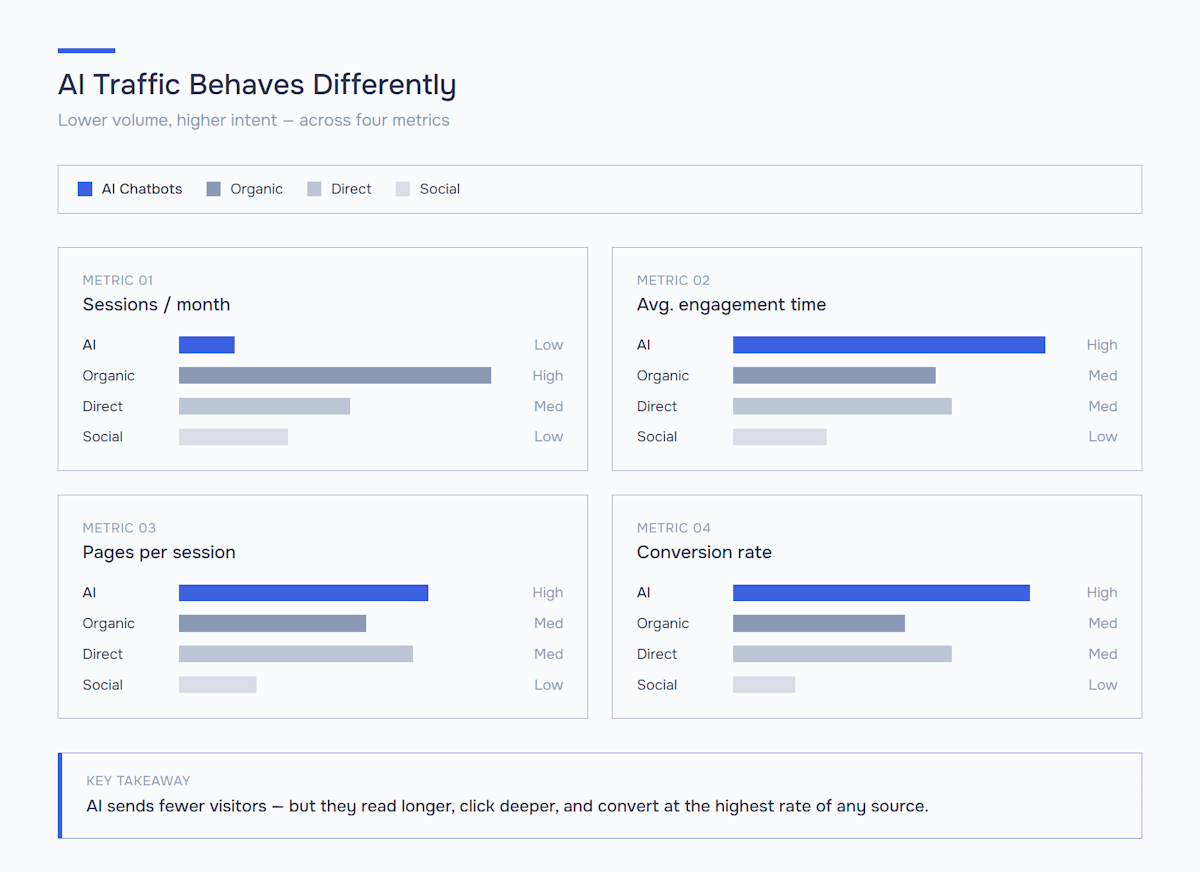
Once populated, this report reveals which pages earn AI citations, how AI-referred users behave versus other traffic sources, and — most importantly — whether that traffic actually converts. Most marketers discover that AI-referred users have notably higher engagement times but lower session counts, reflecting the high-intent nature of post-AI clicks.
What GA4 Cannot Track (And How to Work Around It)
GA4 has real blind spots when it comes to AI traffic, and pretending otherwise will mislead your strategy. Here are the main gaps and practical workarounds.
Google AI Overviews traffic is invisible by default. When a user clicks a source link from an AI Overview, Google passes the referrer as regular organic search. There’s no utm_source=ai_overview parameter and no distinguishing referrer string. The workaround: analyze landing pages that appear in AI Overviews using Google Search Console’s new “AI features” filter (rolled out broadly in 2025), then cross-reference with GA4 landing page performance. For sites that depend heavily on this surface, dedicated AI Overviews SEO optimization is increasingly the only way to influence how often you appear there in the first place.
In-app browsers strip referrer data. When someone taps a ChatGPT citation inside the mobile app, iOS and Android in-app browsers sometimes pass no referrer at all, dumping the session into “Direct.” Workaround: deploy UTM parameters on any URLs you share directly in AI-optimized content (GitHub READMEs, documentation, press releases that LLMs crawl).
Cited-but-not-clicked impressions go uncounted. AI platforms synthesize answers without requiring a click. GA4 only sees visitors who clicked — never those who read your content through an LLM’s summary. Workaround: use dedicated AI visibility monitoring tools to track brand mentions across AI platforms, which measure a metric GA4 structurally cannot.
Private/incognito AI sessions lose context. Users in private browsing modes often arrive with degraded referrer data. There’s no clean fix, but these sessions are a minority.
Connecting AI Visibility, Referral Traffic, and Conversions
The real value of tracking AI traffic isn’t the number itself — it’s connecting three data points into one picture: how often AI platforms mention you, how often those mentions drive clicks, and what those clicks are worth.
Think of it as a funnel:
- AI visibility score — how frequently your brand appears in AI-generated answers across platforms (tracked via specialized tools)
- AI referral traffic — how many of those mentions convert into clicks (tracked in GA4 using this guide)
- AI-driven conversions — how many of those clicks complete your desired action (tracked in GA4 conversion reports filtered by your AI channel group)
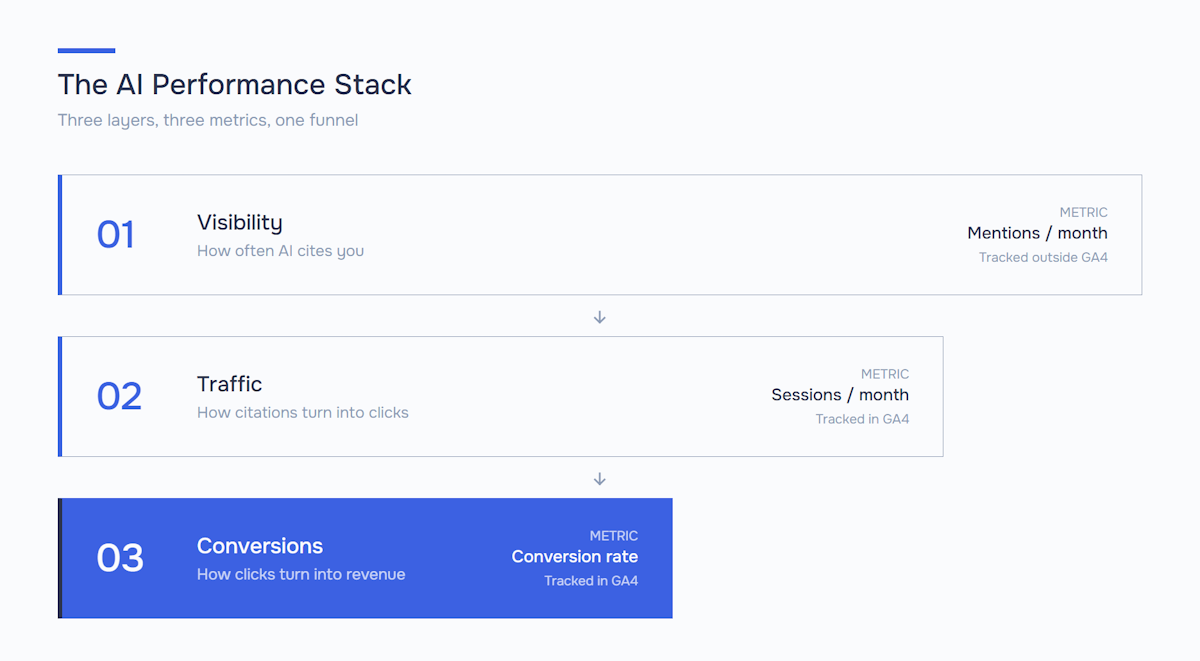
When you view these three metrics together, you can calculate something previously impossible: the effective conversion rate of being cited by an AI. A high visibility score paired with low referral traffic means AI platforms are summarizing your content without sending visitors — a signal to make your content more reference-worthy. Low visibility but high conversion from the traffic you do get means the opposite: scale up your presence, because the audience converts.
Start Measuring Your Real AI Footprint
The GA4 setup in this guide will tell you how much AI referral traffic you’re capturing today. But that number only becomes a strategy when you pair it with two things you can’t see in GA4 alone: how often you’re being cited, and how that compares to competitors winning the same answers.
Pair this guide with a recurring AI visibility benchmark, and you’ll have the full loop — visibility, traffic, and conversions in one view. Marketers running this loop in 2026 catch share-of-voice shifts weeks before they show up in revenue reports. If the data reveals you’re invisible where it counts, a structured AI SEO program is the next logical step beyond measurement.
Run your free AI visibility audit → — see exactly where you rank across ChatGPT, Perplexity, Gemini, and Claude, then use the GA4 setup above to track what that visibility is worth.the ones that will dominate both traditional search and the AI-generated answer boxes of tomorrow.
Frequently Asked Questions (FAQ)
GA4 can separate AI traffic from known web sources, but mobile in-app browsers strip referrer headers, so ChatGPT mobile clicks land in Direct with no fix available. Set up a custom channel group with a regex for chatgpt.com, perplexity.ai, claude.ai and other AI domains — that captures desktop and web sessions reliably.
AI referral traffic converts at a higher rate than average because users who click a citation have already received a synthesized answer — they click to go deeper. Engagement time is longer and bounce rates are lower compared to other referral sources. Measure it before dismissing it.
GA4 cannot distinguish AI Overview clicks from regular organic search — both pass google.com as the referrer with no differentiating parameter. Use Google Search Console’s ‘AI features’ filter in the Performance report, then cross-reference with GA4 landing page data.
Custom channel groups apply to new sessions only — standard reports won’t reclassify past data. Historical sessions are still accessible: use GA4 Explorations with a source regex filter to pull AI-referred sessions from any date range.
Use: chatgpt\.com|chat\.openai\.com|perplexity\.ai|gemini\.google\.com|claude\.ai|copilot\.microsoft\.com|you\.com|poe\.com|meta\.ai — GA4 uses RE2 regex, so dots must be escaped with a backslash. Test the pattern in the filter preview before saving to catch silent errors.
Set it up now — the configuration takes ten minutes and runs permanently. AI referral traffic grew from near-zero to measurable in under two years. Without the channel group in place today, you will have a historical data gap when the volume becomes significant enough to act on.
UTM parameters require you to control the source URL, which is not possible for organic AI citations — platforms link to your pages as they exist. Channel groups based on referrer domain are the only way to capture traffic you did not generate yourself. UTMs and channel groups serve different purposes and should be used together.
Share with


Rate the article