


Introduction
Remember when tracking your website traffic was straightforward? You’d check Google Analytics, see your search rankings, and call it a day. Those days are rapidly becoming history.
The landscape of online discovery is fundamentally shifting. Millions of users now turn to ChatGPT and Perplexity instead of Google for their queries. They’re asking AI assistants for recommendations, researching products, and finding solutions — and these AI tools are linking directly to websites as sources. The problem? Most of this traffic is either invisible or misattributed in your analytics.
If you’re an SEO professional or marketer, this shift presents both a challenge and an opportunity. The challenge is that your traditional metrics are telling an incomplete story. The opportunity is that early adopters who master AI search analytics will have a significant competitive advantage.
In this guide, you’ll learn how to track AI traffic from ChatGPT and Perplexity, understand what makes this traffic different from traditional search, and discover practical methods to measure AI SEO effectiveness. Whether you’re just noticing mysterious referral traffic or ready to build a comprehensive AI analytics strategy, this article will give you the framework to start measuring what matters.
Why AI Search Analytics Matter
The way people find information online is undergoing its most significant transformation since Google’s launch. Understanding this shift isn’t just interesting — it’s becoming essential for anyone serious about digital marketing.
Traditional search engines have trained us to scan through ten blue links, evaluate snippets, and click through to multiple sites. AI search engines work differently. Users have conversations, ask follow-up questions, and receive synthesized answers with direct source citations. When ChatGPT or Perplexity references your content, users arrive at your site with different expectations and behaviors than someone clicking a Google result.
This matters because the traffic behaves differently. AI-referred visitors often have more context about your content before arriving. They’ve already had the AI summarize or quote your material. They might be coming to verify a specific claim, explore a topic more deeply, or take action based on what the AI told them. Understanding this context changes how you should evaluate and optimize for this traffic.
The Attribution Problem: Here’s the uncomfortable truth — a significant portion of your traffic might already be coming from AI sources, and you probably don’t know it. Many analytics setups categorize AI referrals as “direct traffic” or lump them under generic referral sources. This creates a massive blind spot in your data.
Without proper tracking, you can’t answer critical questions:
Which content performs well in AI search?
Are AI visitors more or less engaged than traditional search visitors?
What’s the conversion rate of AI-referred traffic?
How should you adjust your content strategy to optimize for AI discoverability?
These questions are impossible to answer without implementing AI search analytics.
We’re in the early stages of AI search adoption, which means there’s still time to establish best practices and gain advantages before the space becomes crowded. Companies that start tracking and optimizing for AI traffic now will have years of data and insights by the time this becomes standard practice. Moreover, AI search engines are actively looking for high-quality sources to cite. Unlike traditional SEO where you’re competing for ten spots on page one, AI citations work differently (AI SEO ranking factors ↗). There’s opportunity for more diverse content to get referenced, especially for long-tail queries and specialized topics.
Understanding AI Traffic Sources
Before you can track AI traffic effectively, you need to understand how it differs from traditional search traffic and what technical markers can help you identify it.
When someone clicks a Google result, you typically see a clean referral from google.com with search parameters. The user journey is straightforward: search query → results page → your site. With AI search engines, the path is more complex and conversational.
ChatGPT, when it includes clickable citations, sends traffic that may appear with various referral patterns depending on how the link is accessed. Users might click directly from the chat interface, copy links and paste them into browsers, or access content through mobile apps versus web versions. Each of these paths can create different referral signatures in your analytics.
Perplexity operates more like a traditional search engine with AI enhancement, but its referral traffic has unique characteristics. The platform presents sources alongside AI-generated answers, and users often arrive at your site after reading a comprehensive summary. This means they’re typically deeper into their research journey compared to early-stage Google searchers.
Technical markers you need to know about:
- Referral URLs: ChatGPT traffic may appear as
chat.openai.comor variations depending on the access method. Perplexity typically shows asperplexity.aiin your referral sources. However, some traffic might not include proper referral headers, appearing instead as direct traffic. - User-Agent Strings: Some AI platforms use identifiable user-agent strings when accessing your content. For example, Perplexity’s web crawler uses specific identifiers that can be tracked in server logs. However, when actual users click through from AI interfaces, they’ll use their browser’s standard user-agent.
- Traffic Patterns: AI-referred traffic often shows distinctive behavioral patterns. Higher time-on-page for specific articles, lower bounce rates for in-depth content, or concentration on particular content types that AI engines tend to cite more frequently.
One of the trickiest aspects of AI search analytics is attribution ambiguity. Not all AI traffic identifies itself clearly. Some arrives without referral information, some gets attributed to mobile apps, and some might come through intermediary services. This makes it essential to use multiple tracking methods rather than relying on a single approach. Understanding these technical nuances prepares you for implementing practical tracking solutions.
Methods to Track AI Traffic
Now let’s get practical. Here are three proven methods to track AI traffic, each with its own strengths and implementation requirements.
Method 1: Analyzing Referral Sources in Google Analytics 4
The most accessible starting point for most marketers is leveraging GA4’s built-in referral tracking with some custom configuration.
GA4 automatically captures referral sources, so if ChatGPT or Perplexity properly passes referral information, you’ll see it under Traffic Acquisition reports. However, the default setup often buries AI referrals among hundreds of other sources. Here’s how to make AI traffic visible:
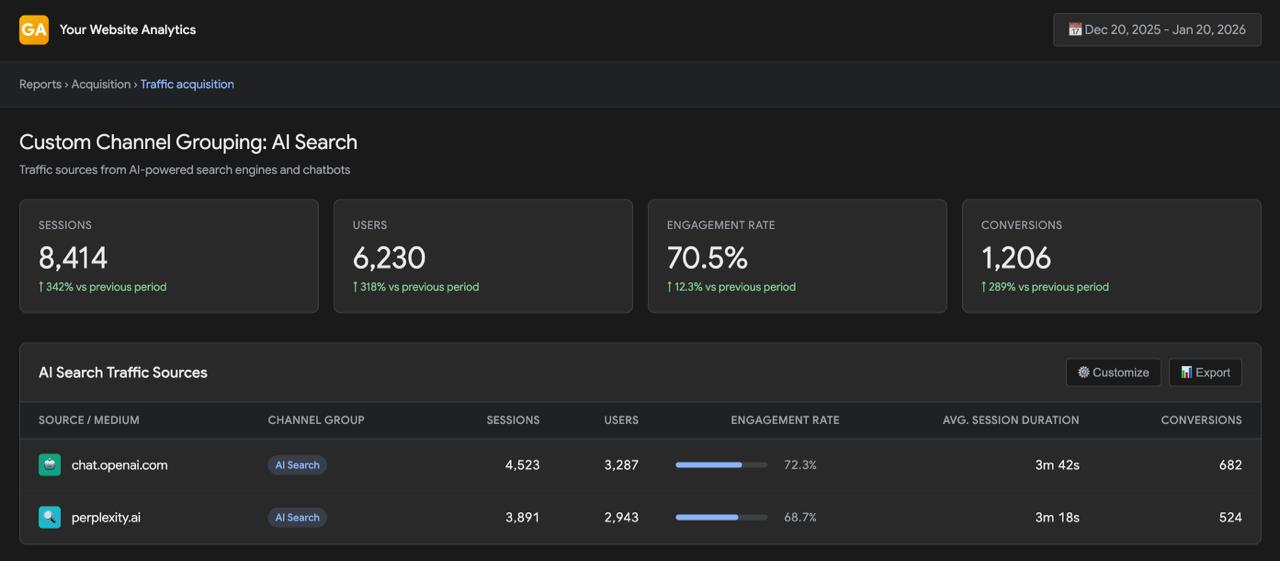
First, navigate to your GA4 property and set up custom channel groupings. Create a new channel specifically for “AI Search” that includes referral sources matching chat.openai.com, perplexity.ai, and related domains. This consolidates scattered AI referrals into one trackable category.
Next, create custom segments for deeper analysis. Build segments that combine referral source data with behavioral metrics. For example, segment visitors who arrive from Perplexity and spend more than two minutes on site, or those who come from ChatGPT and view more than three pages. These segments help you understand not just volume, but quality of AI traffic.
Method 2: UTM Parameters and Custom Tracking
For more comprehensive tracking, especially if you actively work to get cited in AI search results, implement custom UTM parameters specifically for AI contexts.
While you can’t control UTM parameters on organic AI citations, you can use them strategically when you engage with AI platforms. If you’re creating content specifically designed to be cited by AI, or if you’re participating in conversations where you share your own links, append custom parameters like ?utm_source=ai_search&utm_medium=chatgpt or ?utm_source=ai_search&utm_medium=perplexity.
The real power of this method comes from creating a systematic taxonomy for AI traffic. Establish consistent naming conventions: use ai_search as your source category, differentiate by platform in the medium field, and use campaign names to track specific content initiatives optimized for AI discoverability.
Additionally, consider implementing event tracking for AI-related interactions. Set up custom events in GA4 that fire when users arrive from known AI referrals and complete specific actions — like downloading resources, signing up for newsletters, or making purchases. This helps you understand not just traffic volume but business impact.
Method 3: Server Log Analysis and User-Agent Tracking
For the most comprehensive view — including traffic that doesn’t show proper referral information — dive into server-level tracking.
Server logs capture every request to your website, including information that often gets lost in client-side analytics. This includes full user-agent strings, referral headers, IP addresses, and request patterns. By analyzing these logs, you can identify AI-related traffic that slips through other tracking methods.
Look for specific patterns in your server logs: requests from IP ranges associated with AI platforms, user-agent strings that indicate AI crawlers or interfaces, and traffic patterns that match AI referral behavior (such as sudden spikes when content gets featured in AI responses).
Tools like Cloudflare Analytics, AWS CloudWatch, or specialized log analysis platforms can help process this data at scale. Set up filters to flag potential AI traffic based on referral patterns, user-agent characteristics, and behavioral signals. Then cross-reference these findings with your GA4 data to identify gaps and improve overall tracking accuracy.
Comparing the Three Methods
Here’s a quick comparison to help you choose the right approach:
| Method | Implementation Difficulty | Coverage | Cost | Best For |
|---|---|---|---|---|
| GA4 Referral Tracking | Easy | Moderate (only proper referrals) | Free | Getting started quickly, basic visibility |
| UTM Parameters | Easy-Moderate | Limited (controlled links only) | Free | Campaign tracking, content you share |
| Server Log Analysis | Hard | Comprehensive (all traffic) | Low-High | Technical teams, complete attribution |
The best strategy combines multiple methods. Start with GA4 referral tracking to capture the obvious AI traffic. Layer on UTM parameters for content you control. If you have technical resources, add server log analysis to catch what others miss. This multi-layered approach gives you the most complete picture of your AI traffic landscape.
Tools & Platforms for AI Search Analytics
Having the right tools makes tracking and analyzing AI traffic significantly easier. Let’s explore what’s available and how to choose what fits your needs.
Google Analytics 4 remains the cornerstone for most organizations’ analytics stack, and it’s perfectly capable of tracking AI traffic with proper configuration. Beyond basic referral tracking, GA4’s exploration features let you dive deep into AI traffic behavior.
Use GA4’s exploration reports to create custom analyses combining AI traffic sources with engagement metrics, conversion paths, and audience characteristics. Build funnels to understand how AI-referred visitors move through your site compared to other traffic sources. Set up comparisons that show AI traffic performance against traditional search traffic side-by-side.
The key is treating AI traffic as its own distinct channel worth dedicated analysis, not just another line item in your referral report. Create custom dashboards that surface AI metrics prominently, making it easy to spot trends and shifts in this growing traffic segment.
As AI search grows, specialized tools are emerging to help marketers track and optimize for this new channel. While the space is still evolving, several platforms offer features specifically designed for AI search analytics.
Some tools focus on monitoring when and how your content gets cited in AI responses. They track mentions across multiple AI platforms, alert you to new citations, and help you understand which content performs best in AI contexts. These platforms essentially provide “rank tracking” for the AI search era — helping you see your visibility in AI responses over time.
Other platforms emphasize competitive analysis, showing you how your AI search presence compares to competitors. They might track share of AI citations in your industry, identify content gaps where competitors are getting cited instead of you, or highlight opportunities to create AI-friendly content in underserved topic areas.
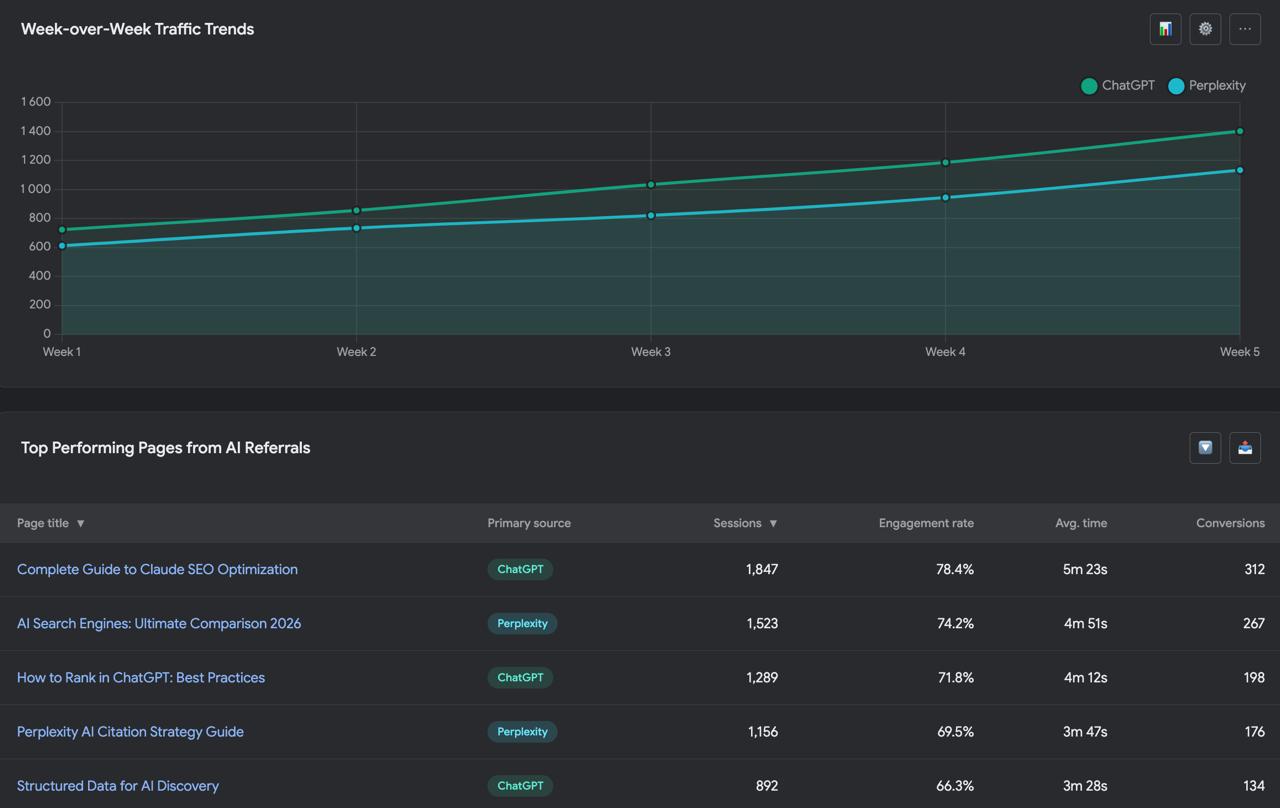
Whatever tools you choose, integration is crucial. Your AI search analytics shouldn’t exist in isolation — it needs to connect with your broader marketing data ecosystem. Ensure your tracking solution integrates with your existing analytics stack. Data should flow into your business intelligence tools, inform your SEO strategy, and influence content planning.
Your ideal toolkit depends on several factors: the volume of AI traffic you’re currently seeing, your technical resources, your budget, and how central AI search is to your overall strategy. If you’re just starting to pay attention to AI traffic and have limited resources, begin with enhanced GA4 configuration. It’s free, you’re probably already using it, and it handles the basics well. As AI traffic grows and becomes more important to your business, invest in specialized tools that provide deeper insights and automation. For organizations looking for comprehensive support, professional AI SEO services (AI SEO services explained ↗) can help implement and optimize your entire tracking infrastructure.
Best Practices & Key Metrics
Tracking AI traffic is just the beginning. The real value comes from knowing what to measure and how to interpret what you’re seeing.
Not all metrics matter equally for AI-referred visitors. Here are the essential indicators to focus on:
| 📊 Metric Category | 👀 What to Track | 🎯 Why It Matters | 🔍 Benchmark Against |
|---|---|---|---|
| Volume | Sessions from ChatGPT/Perplexity | Shows adoption and growth trends | Week-over-week, month-over-month growth |
| Engagement | Time on page, pages/session, scroll depth | Indicates content relevance and quality | Traditional search traffic |
| Conversion | Goal completions, conversion rate | Measures business impact | Overall site conversion rate |
| Content Performance | Top pages by AI traffic, citation frequency | Reveals what AI finds valuable | Internal content benchmarks |
| User Journey | Assisted conversions, path analysis | Shows role in conversion funnel | Multi-channel attribution data |
How to interpret what you’re seeing:
Compare AI traffic to traditional search, but recognize they serve different purposes. AI-referred visitors might have lower raw volume but higher conversion rates, or vice versa. Neither is inherently better — they represent different parts of the user journey.
Look for trends over time rather than fixating on point-in-time snapshots. AI search is growing rapidly, and last month’s patterns might not hold next month. Build processes to review AI metrics regularly and adjust strategy based on what’s working.
Consider the user journey holistically. AI traffic might assist conversions that get attributed to other channels. Someone might discover you through Perplexity, visit directly later, and convert. Traditional last-click attribution misses this contribution. Look at assisted conversions and multi-touch attribution to understand AI traffic’s full impact.
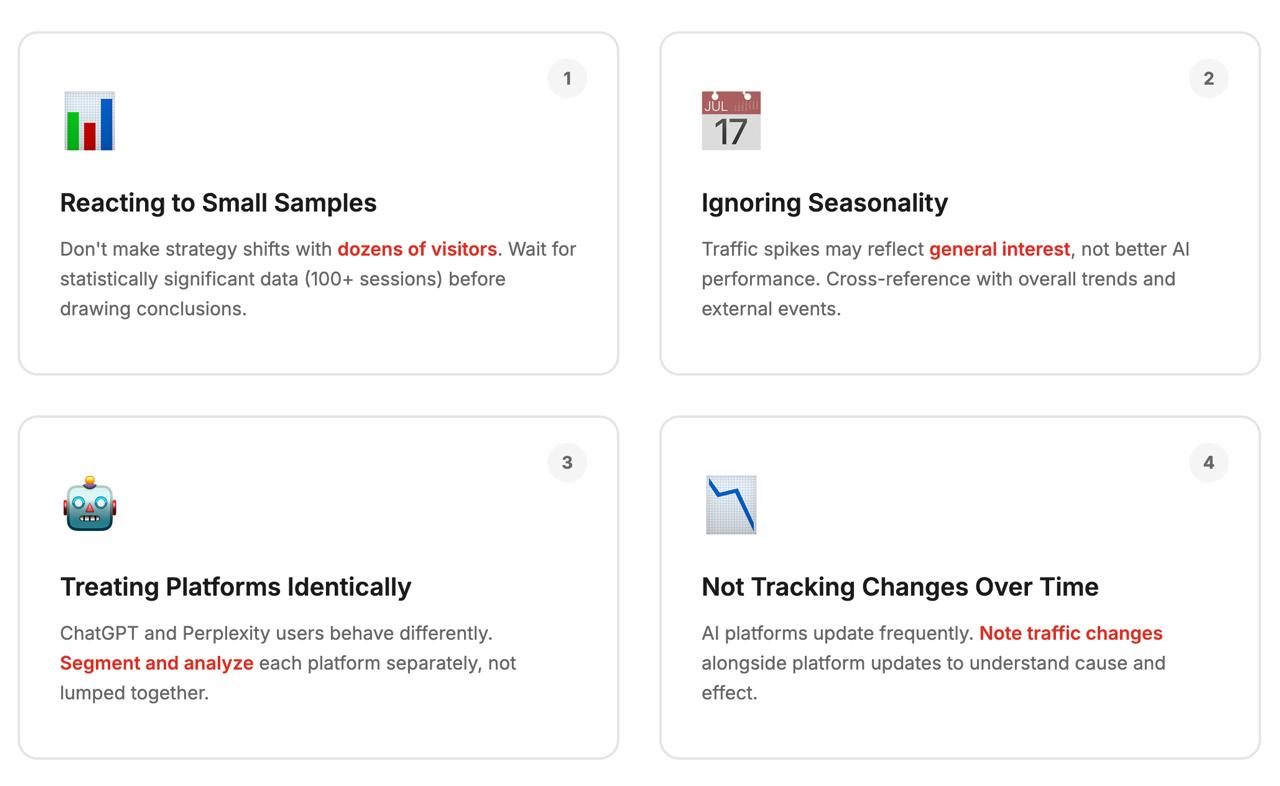
Common mistakes to avoid:
ChatGPT and Perplexity users behave completely differently, yet most marketers track them the same way. See why this matters in the detailed breakdown below.
Conclusion
The rise of AI search isn’t replacing traditional SEO — it’s adding a crucial new dimension to how people discover content online. The marketers and SEO professionals who adapt quickly will find significant opportunities in this shift.
Here’s what you need to remember: AI search traffic is already happening, whether you’re tracking it or not. The question isn’t whether to measure it, but how quickly you can establish comprehensive tracking to inform your strategy. Start with the basics — configure GA4 to properly categorize AI referrals, create segments to analyze this traffic, and begin monitoring key metrics.
As your AI traffic grows, layer on more sophisticated tracking methods. Add UTM parameters for content you control, dive into server logs for comprehensive visibility, and consider specialized tools as this channel becomes more central to your strategy.
Most importantly, don’t wait for perfect data before acting. The AI search landscape is evolving rapidly, and early adopters who experiment, measure, and iterate will build advantages that late arrivals will struggle to overcome. Begin tracking today — whether you implement this independently or work with AI SEO specialists like ICODA to accelerate your setup — learn from what you see, and adjust your content strategy accordingly.
The future of search is already here — it’s just not evenly distributed yet (AI SEO future predictions ↗). By implementing AI search analytics now, you’re positioning yourself to thrive as this future becomes mainstream. Your competitors might still be debating whether AI search matters. You’ll have months or years of data showing you exactly what works.
Frequently Asked Questions
Check your Google Analytics 4 referral sources for chat.openai.com and perplexity.ai domains, or look for unexplained direct traffic spikes that correlate with your content being cited in AI responses. You can also analyze server logs for AI-specific user agents and referral patterns.
Yes, GA4 can track AI traffic, but you’ll need to configure custom channel groupings and segments to properly identify and measure AI SEO performance. Without these customizations, AI referrals often get buried in generic traffic categories or misattributed as direct visits.
AI search traffic typically shows higher engagement metrics because visitors arrive with more context from AI-generated summaries, while traditional search traffic comes from users scanning multiple results. AI-referred visitors often have different intent — they’re verifying claims or seeking deeper information rather than browsing options.
AI traffic volumes vary significantly by industry and content type, but most sites currently see 2-8% of total traffic from AI sources like ChatGPT and Perplexity. This percentage is growing rapidly as AI search adoption increases, making it crucial to track AI traffic early and establish baseline metrics.
Google Analytics 4 handles basic AI referral tracking well, but specialized AI search analytics tools provide deeper insights into citation frequency, competitive positioning, and content performance across AI platforms. For comprehensive AI SEO strategy, agencies like ICODA combine multiple tracking methods with professional optimization services to maximize your AI discoverability.
AI search optimization can show results within 2-4 weeks as platforms quickly index and cite quality content, much faster than traditional SEO which takes 3-6 months. However, building sustainable AI traffic requires ongoing tracking, content refinement, and adaptation to platform updates to maintain your visibility in AI recommendations.
Share with


Rate the article