




Introduction
Here’s something that might surprise you: Google AI Overviews now appear in more than 60% of U.S. search queries — double what it was just a year ago [1]. When someone asks Google, ChatGPT, or Perplexity to recommend a business, these systems pull from structured data sources they trust — and your Google Business Profile sits at the top of that list.
The problem? Most businesses still treat their GBP like a digital business card they set up once and forgot. Only 22% of marketers are actively tracking their AI visibility [2], which means 78% have no idea whether AI is recommending them or their competitors.
AI-powered search has gone mainstream. Already, 44% of users say AI is now their primary source for making decisions [3] — yet just 16% of brands systematically track their AI search performance [4]. That gap is your opportunity. Founders and marketers who optimize their Google Business Profile for AI visibility now will hold a significant advantage as AI-assisted search becomes the default in 2026 and beyond.
In this article, you’ll learn exactly how Google Business Profile works, why it matters more than ever for AI visibility, and how to create and optimize yours step by step. We’ll cover the practical how-to, but more importantly, we’ll explain the strategic why — so you’re not just following instructions, you’re understanding the system.
Let’s dive in.
What is Google Business Profile?
Google Business Profile (GBP) is a free tool that lets you manage how your business appears across Google Search and Google Maps. When someone searches for your business name or a service you offer, your GBP is what shows up in that information panel on the right side of search results or as a pin on Maps.
If you’ve heard of “Google My Business,” you already know the basics. Google rebranded it to Google Business Profile in 2021, moving management directly into Search and Maps rather than a separate app. The functionality expanded, but the core purpose remained: give businesses control over their presence in Google’s ecosystem.
Your profile includes several key elements:
- Business name and category – What you’re called and what type of business you are
- Contact information – Address, phone number, website, hours of operation
- Business description – A 750-character summary of what you do (and yes, keywords still matter here — just not the way they used to)
- Photos and videos – Visual content showcasing your location, products, or team
- Reviews and ratings – Customer feedback and your responses
- Q&A section – Questions from potential customers with your answers
- Google Posts – Updates, offers, and announcements you publish
- Attributes – Specific features like “wheelchair accessible,” “free Wi-Fi,” or “women-owned”
Here’s what many businesses miss: GBP isn’t just a card on Maps. It’s a structured data repository that Google (and increasingly, other AI systems) uses to understand what your business is, what it offers, and whether it’s trustworthy. Every field you fill out gives these systems more information to work with when deciding whether to recommend you. This is why leading AI SEO companies now treat GBP optimization as a core part of their strategy — not an afterthought.
The AI Visibility Connection: Why GBP Matters Now More Than Ever
This is where things get strategic. To understand why GBP matters for AI visibility, you need to understand how AI systems decide which businesses to mention.
When you ask an AI assistant “best fintech API for cross-border payments” or “top Web3 wallet with staking features,” it doesn’t randomly generate an answer. It pulls from data sources, evaluates them for relevance and trustworthiness, and synthesizes a response. The question is: which sources does it trust?
AI systems — whether Google’s AI Overviews, ChatGPT with web browsing, Perplexity, or Gemini — prioritize structured, verified information. Your website content matters, but it’s unstructured. AI has to parse through paragraphs, navigation menus, and marketing copy to extract facts. Your GBP, by contrast, is already organized into clean fields: business type, location, hours, services, reviews.
More importantly, GBP data is verified. When you claim your profile, you go through a verification process (usually a postcard, phone call, or video). This tells AI systems that the information comes from a legitimate source — the business owner — not a third party or outdated scrape.
The numbers show just how much is at stake:
The Cost of Waiting ⏳
of AI Overview citations come from top 10 search results. If you’re not ranking, AI won’t find you.
higher click-through rate for brands cited in AI answers. Being mentioned by AI amplifies your visibility.
organic CTR drop when AI Overviews appear. Businesses not cited lose more than half their traffic.
more clicks for businesses with complete Google Business Profiles versus incomplete ones.
The good news? Most businesses haven’t caught on yet — which means the opportunity is wide open for those who act now.
Here’s what happens in practice:
When a user asks AI for a recommendation, the system considers:
- Relevance – Does this business match what the user is looking for?
- Completeness – Does the system have enough data to confidently recommend it?
- Freshness – Is the information current, or could it be outdated?
- Reputation – What do reviews and ratings indicate about quality?
- Verification – Is this data from a trustworthy source?
Your GBP directly influences all five factors. An incomplete profile looks like an abandoned business. Outdated hours suggest unreliability. Few or no reviews give AI nothing to assess reputation. And an unclaimed profile lacks the verification signal entirely.
The good news? Most of your competitors haven’t figured this out yet. They’re still thinking of GBP as a local SEO checkbox, not an AI visibility asset. When you optimize your profile with AI in mind, you’re speaking the language these systems understand.
Consider a practical scenario: A user in Chicago asks their AI assistant for “a good accountant for small business taxes.” The AI needs to provide a helpful, accurate answer. It will favor businesses with:
- Complete profiles that clearly state they serve small businesses
- Recent reviews mentioning tax services
- Updated hours and contact information
- A business description with relevant keywords
If your GBP checks these boxes and your competitor’s doesn’t, you’re more likely to be the recommendation.
How to Create and Optimize Your Google Business Profile
Now let’s get practical. Here’s how to set up your GBP from scratch — or optimize an existing one — with AI visibility in mind.
1️⃣ Step 1: Claim or Create Your Profile
Start by searching for your business on Google. If a profile already exists (Google sometimes creates them from public data), you’ll see an option to “Claim this business.” If not, go to google.com/business and click “Manage now” to create one.
You’ll need to verify ownership. Google typically offers verification via:
- Postcard mailed to your business address
- Phone call
- Video recording of your location
Why it matters for AI: Verification is the foundation of trust. An unverified profile is essentially invisible to AI systems looking for reliable data sources.
2️⃣ Step 2: Complete Every Field
This is where most businesses cut corners — and where you gain an advantage. Fill out every available field, even if it seems minor.
- Business name (use your real name, no keyword stuffing)
- Primary and secondary categories
- Address and service areas
- Phone number and website
- Hours of operation (including special hours for holidays)
- Business description
- Opening date
- All relevant attributes
Why it matters for AI: Completeness signals legitimacy. AI systems are more confident recommending a business when they have comprehensive data. An incomplete profile creates uncertainty — and AI avoids uncertainty.
3️⃣ Step 3: Choose the Right Categories
Your primary category is the most important. It tells Google (and AI) what type of business you are at the most fundamental level. You can add up to nine secondary categories to capture additional services.
Be specific. “Restaurant” is too broad. “Italian Restaurant” or “Vegan Restaurant” gives AI precise data to match against user queries.
Why it matters for AI: Categories are how AI filters businesses for relevance. If someone asks for “a vegan restaurant in Austin,” your business won’t surface unless your category reflects that.
4️⃣ Step 4: Write an AI-Optimized Business Description
You have 750 characters to describe your business. Use them wisely.
Include:
- What you do and who you serve
- Your location or service area
- Key services or products (using natural language, not keyword lists)
- What makes you different
Write for humans first, but include the terms people actually use when searching. If customers call your service “tax prep,” don’t write “financial document preparation services.”
Why it matters for AI: Your description gives AI natural language context about your business. When someone asks a conversational question like “who can help me with my startup’s taxes,” AI looks for descriptions that match that language.
5️⃣ Step 5: Add High-Quality Photos and Videos
Upload photos of your:
- Exterior (helps customers find you)
- Interior (shows what to expect)
- Team (builds trust)
- Products or services in action
Add videos if possible. Google recommends videos be 30 seconds or shorter.
Why it matters for AI: Visual content signals an active, legitimate business. It also feeds into visual search — when users search with images or ask AI to “show me” something.
6️⃣ Step 6: Manage Reviews Strategically
Reviews are critical — not just for social proof, but for AI understanding.
- Ask satisfied customers to leave reviews
- Respond to every review, positive or negative
- In your responses, naturally mention your services (e.g., “We’re glad you enjoyed our small business tax services!”)
Why it matters for AI: AI systems analyze review content, not just star ratings. When multiple reviews mention “great for startups” or “fast turnaround,” AI learns to recommend you for those specific needs.
7️⃣ Step 7: Use Google Posts and Q&A
Google Posts let you share updates, offers, events, and news directly on your profile. The Q&A section allows customers to ask questions — and you to provide answers.
- Post at least once a week
- Monitor Q&A and answer quickly
- Pre-populate Q&A with common questions and answers
Why it matters for AI: Recent activity signals that your business is operational and your information is current. Posts also give AI additional content to understand what you offer.
8️⃣ Step 8: Keep Information Updated
This is ongoing. Whenever something changes — hours, services, location — update your profile immediately. Set a reminder to review your profile monthly.
Why it matters for AI: Outdated information erodes trust. If AI recommends your business based on old data and the user has a bad experience, that reflects poorly on the AI’s reliability. Systems learn to avoid businesses with inconsistent or stale data.
Advanced Tips for AI Visibility
Once your basics are solid, these advanced tactics can push you further ahead.
Leverage GBP Attributes
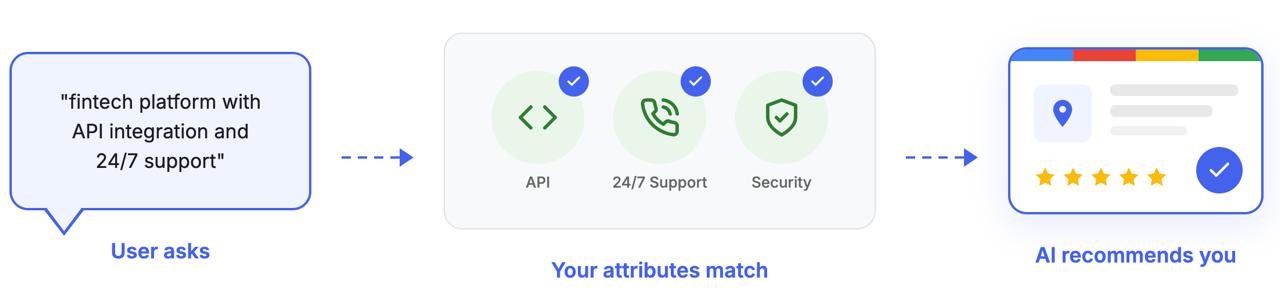
Attributes are the checkboxes for specific features: “accepts cryptocurrency,” “offers virtual consultations,” “24/7 support,” “API available.” These create precise data points that AI uses for filtered searches. When someone asks “fintech platform with API integration and multi-currency support,” attributes determine who shows up.
Connect GBP with Your Website Schema
Add LocalBusiness or FinancialService schema markup to your website that matches your GBP data exactly. This creates consistency across data sources, reinforcing your information’s accuracy. AI systems cross-reference multiple sources; matching data builds confidence.
Maintain NAP Consistency
NAP stands for Name, Address, Phone number. These should be identical everywhere: your website, GBP, social media, directories, and local citations. Inconsistencies create doubt. AI systems may deprioritize businesses with conflicting information across the web.
Understand How Reviews Influence AI Recommendations
AI doesn’t just count stars. It performs sentiment analysis and extracts keywords from review text. A fintech company with 4.2 stars but dozens of reviews specifically praising “fast KYC process” or “seamless API integration” may rank higher for those queries than a 4.5-star competitor with generic reviews.
Encourage clients to be specific in their reviews. Instead of “Great platform!” aim for “Best staking rewards and the fastest withdrawals I’ve experienced in DeFi.”
Common Mistakes That Hurt Your AI Visibility
Even well-intentioned businesses make errors that undermine their AI presence. Here’s what to avoid:
1) Incomplete Profile
Leaving fields blank doesn’t just look unprofessional — it limits the data AI has to work with. If you haven’t filled in your business description, AI has no context beyond your category.
2) Outdated Information
Changed your hours last year but never updated GBP? Moved offices but kept the old address? AI systems will eventually learn your data is unreliable — and stop recommending you.
3) Ignoring Reviews
Unresponded reviews signal a disengaged business. Negative reviews without responses look even worse. AI sees engagement as a trust signal.
4) No Connection with Other Local Signals
If your GBP says one thing but your website, Yelp, and Facebook say another, AI gets confused. Consistency across platforms is essential.
| ⭐ Optimized GBP | Neglected GBP |
| All fields completed | Name, address, phone only |
| Weekly posts and updates | No activity for months |
| 50+ reviews with responses | Few reviews, no responses |
| Consistent NAP across web | Conflicting information |
| Specific category selection | Generic “Business” category |
| Recent photos and videos | Outdated or no images |
| ✅ Result: High AI visibility | ❌ Result: Invisible to AI |
Conclusion
Google Business Profile has evolved from a simple local listing into a critical data source for AI systems. When ChatGPT, Google AI Overviews, Perplexity, or Gemini need to recommend a business, they look for structured, verified, complete, and current information — exactly what an optimized GBP provides.
The opportunity right now is timing. AI search is growing rapidly, but most businesses haven’t adapted their GBP strategy to account for it. Those who optimize now — who treat their profile as an AI asset rather than a static listing — will capture visibility that becomes harder to earn as competition catches on.
The steps aren’t complicated: claim and verify your profile, complete every field, choose precise categories, write a thoughtful description, add quality visuals, engage with reviews, post regularly, and keep everything updated. What makes the difference is understanding why each step matters and committing to ongoing maintenance.
At ICODA, we’ve seen firsthand how businesses that approach digital presence strategically — including AI-optimized GBP management — consistently outperform those who treat it as an afterthought. The data is clear, the process is actionable, and the window is open.
Sources:
- [1] Advanced Web Ranking (via Xponent21) – New Data: Google AI Overviews Now Appear in 60% of Searches, 2025
- [2] Exposure Ninja – AI Search Statistics for 2025, 2025
- [3] McKinsey & Company – AI Discovery Survey, 2025
- [4] McKinsey & Company – CMO Survey (Fortune 500), 2025
Share with


Rate the article